Turning a Shape You Can Measure Into a Bag Count
Most bag-estimating goes wrong before a single division happens. You are standing at a form, a trench, or a row of augered holes with a tape measure and a set of dimensions in mixed units — a slab quoted in feet with a thickness quoted in inches, a hole diameter in inches with a depth in feet — and the volume has to come out of that before the bag count means anything. This calculator is built for that moment. It takes the physical shape as its input, derives the volume itself, and only then converts to bags. If you already hold a cubic-yard figure, you are one step further along and want the 80 lb bags-per-yard calculator instead — that split is explained in full below. For the wider bag-counting reference, our pillar guide on calculating bags of concrete collects the methods and project charts in one place.
Five geometry modes cover almost every job small enough to bag: slab and footing are rectangular prisms (length × width × thickness), post holes and sonotubes are cylinders repeated a set number of times, and custom volume is the escape hatch when the shape does not fit either. Every dimension is entered in a single linear unit — feet, inches, meters, centimeters, or millimeters — converted internally, multiplied, and then divided by the yield of the bag size you picked. The result is the exact count plus ready-to-order +5% and +10% buffers, with the same volume shown in yd³, ft³ and m³ so you can price the bagged route against a truck without re-deriving anything. Because the yields are approximate compacted figures, no output should ever be ordered without a waste allowance — 66.7 bags on paper is 70 bags in the cart.
The Five Shape Modes and What Each One Assumes
Slab Mode — Flatwork With a Thin Third Dimension
Length × width × thickness for pads, walks and shed floors. The trap is the third field: thickness is the only dimension normally spoken in inches while the other two are spoken in feet, and it is the one that scales the whole answer. At 4 in a single 0.60 ft³ bag covers 1.80 sq ft.
Footing Mode — The Same Math, a Different Failure
Length × width × height, identical arithmetic to slab mode. It is separated because trenched footings are the one rectangular pour where the excavated shape rarely matches the drawn shape — sidewalls slough, the bucket over-cuts, and the real volume runs over the nominal.
Post Hole Mode — Cylinders, Multiplied
Diameter × depth × count, evaluated as π × (d ÷ 2)² × depth for one hole and multiplied by the number of identical holes. Eight 12 in × 30 in holes come to 15.71 ft³ in one pass rather than eight separate calculations.
Sonotube Mode — Cylinders That Hold Their Shape
Mathematically the same cylinder as a post hole, practically the opposite: a fibre tube is a manufactured form, so the diameter you enter is the diameter you get. Six 12 in × 48 in tubes need 32 × 80 lb bags with none of a dug hole's over-excavation slack.
Custom Volume — Skips the Geometry Entirely
Enter cubic yards in Imperial or cubic meters in Metric and no dimension fields appear. Use it for compound shapes you have already summed by hand, or for the leftover piece of an L-shaped pour after the main rectangle has been run.
One Linear Unit for Every Field
The calculator does not accept mixed units within a single shape. Feet plus an inch thickness means entering the thickness as a decimal foot, or switching the whole form to inches. This is the single most common source of a ten-fold error in a bag count.
Bag Size Is Chosen After the Shape
Geometry and bag size are independent decisions, so the tool separates them. Pick the shape first, then 40, 50, 60, 80 lb or metric 20 kg — the yield panel beside the selector shows what that bag produces so you can confirm it against the product in front of you.
Whole-Bag Rounding on the Hero Figure
The headline count is the exact figure rounded up, because a fractional bag is not purchasable. The Exact / +5% / +10% tiles below preserve the unrounded number so you can see how much of the last bag is actually being used.
Repeated Elements Counted in One Pass
Both cylinder modes carry a count field. Eight identical footings or six identical piers are one entry, not eight — which removes the transcription step where a per-hole figure gets multiplied wrong on paper.
Volume Reported Beside the Bag Count
The derived volume is shown in m³, yd³ and ft³ alongside the bags, so the moment the shape turns out to be bigger than expected you already hold the number a ready-mix dispatcher will ask for.
Bags ↔ Yards Utilities for Cross-Checks
Three small converters sit under the results — Bags → Yards, Yards → Bags, and Volume → Bags. The last one accepts a manufacturer yield different from the standard table, which is how you re-run a count for a specialty product.
Printable Dimension Sheet
Print / Save produces a page carrying the shape, every entered dimension, the unit system, the derived volume and all three bag counts — a record of what was measured, not just what was ordered.
Entering Your Project Dimensions
- 1In Step 1, choose the Unit System (Imperial or Metric). This also decides how a Custom Volume entry is read — cubic yards in Imperial, cubic meters in Metric.
- 2Still in Step 1, set the Linear Units (ft, in, m, cm, or mm). Every dimension field in Step 2 will be read in this unit — there is no per-field override.
- 3Pick the Project Type. Slab and Footing expose three rectangular fields; Post Holes and Sonotube expose diameter, depth and a count; Custom Volume hides the geometry fields entirely.
- 4For a rectangular pour, enter length, width and thickness. With units set to feet, a 4 in thickness is entered as 0.33 — or switch the units to inches and enter every dimension in inches instead.
- 5For a cylindrical pour, enter the diameter (not the radius), then the depth or tube height, then how many identical holes or tubes the job has.
- 6Measure the hole you actually dug, not the auger you rented. A 12 in auger in soft ground routinely leaves a hole closer to 13–14 in at the top, and that difference is squared in the volume.
- 7In Step 3, select the bag size. The teal panel beside the selector shows that bag's approximate yield — check it against the printed yield on the product you are buying.
- 8Press Calculate. The hero figure is bags rounded up to whole bags; the tiles below carry the exact count, the +5% and +10% counts, and the volume in m³, yd³ and ft³.
- 9Choose a buffer to order against: +5% for a formed, measured pour with machine mixing, +10% for hand-dug holes, over-cut trenches, or any hand-mixed work where spillage accumulates.
- 10If your product prints a yield different from the standard table — fast-setting and high-strength lines often do — use the Volume → Bags utility with that manufacturer's figure rather than the default.
- 11For an L-shaped or stepped pour, split it into rectangles and cylinders, run each shape separately, and add the bag counts before you buy. Do not average the dimensions.
- 12Click Print / Save for a PDF-ready sheet listing every dimension, the derived volume and all three bag counts to take to the supplier.
How Each Shape Becomes a Volume
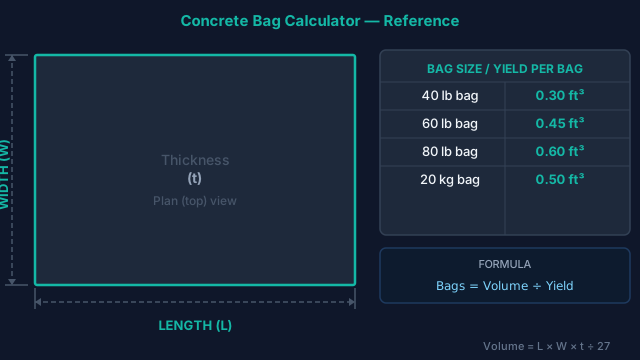
- 1) Rectangular shapes — slab and footingVolume = Length × Width × Thickness
All three dimensions are converted to a common base unit before multiplying, which is why they must be entered in the same linear unit. The thickness term is the sensitive one: doubling a slab from 4 in to 8 in doubles the bag count, while adding a foot to the length of a 10 ft-wide pad adds only about 5.6 bags. - 2) Cylindrical shapes — post holes and sonotubesVolume = π × (Diameter ÷ 2)² × Depth × Count
Enter the diameter; the calculator halves it. Because the radius is squared, a measurement error here costs roughly twice what the same proportional error costs on a slab dimension — a hole 10% wider than entered holds about 21% more concrete. - 3) Bags from volumeBags = Volume ÷ Yield per Bag, rounded up
Approximate yields, held in the site's shared engine constants: 40 lb → 0.30 ft³; 50 lb → 0.375 ft³; 60 lb → 0.45 ft³; 80 lb → 0.60 ft³. The hero figure rounds up because a fraction of a bag cannot be bought; the Exact tile keeps the unrounded number so you can see how much of the last bag is being used. - 4) Ordering buffersBags (+5%) = Exact × 1.05 | Bags (+10%) = Exact × 1.10
Applied to the unrounded count, then rounded up. The published yields are approximate compacted figures with no allowance for uneven subgrade, over-excavation or spillage, so a buffer is not optional on a real order — 5% for measured formwork, 10% for anything dug by hand. - 5) Coverage cross-check for flatworkArea per Bag (ft²) = Yield (ft³) ÷ (Thickness in ÷ 12)
An independent way to verify a slab count without repeating the same multiplication. At 4 in an 80 lb bag covers 1.80 ft², so 56 bags cover 100 ft². Applied to the 120 ft² example below that predicts 68 bags, against 67 from the volume route — agreement to within the rounding step. - 6) Unit conversions1 yd³ = 27 ft³ | 1 m³ ≈ 35.315 ft³ ≈ 1.308 yd³
Cubic yards are the US ready-mix ordering unit. The three-way readout exists so that a shape which turns out to be larger than expected can be quoted to a truck without re-measuring anything.
Worked Example 1 — A 12 × 10 ft Shed Pad at 4 Inches
Set the project type to Slab, units to feet, and enter 12 for length, 10 for width, and — the step that catches people — 0.33 for thickness, because 4 inches expressed in feet is 4 ÷ 12. Typing 4 into a form set to feet asks for a 4-foot-thick slab and returns a count twelve times too large. The volume comes out at 40 ft³ (1.48 yd³), which at 0.60 ft³ per 80 lb bag is 66.7 bags exactly — a hero figure of 67. Now pick the buffer against the conditions: a screeded pad on a prepared sub-base takes the +5% figure, 70 bags; a pad poured onto rough grade takes +10%, 74 bags. Switching to 60 lb bags for easier lifting moves the same pour to 89 bags — no less concrete, no less total weight, just 22 more sacks to open. And the reality check: 67 bags is 5,360 lb of material to haul, mix and place before the first batch sets. At 1.48 yd³ this pour sits right at the line where a short-load ready-mix delivery is usually cheaper and far less work, so price the slab pour against a truck before you start lugging bags.
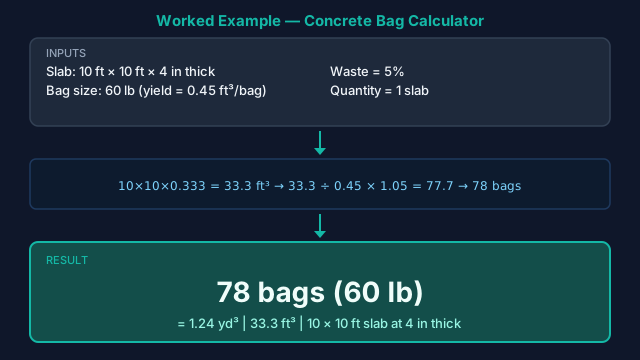
The same three fields carry any rectangular pour. Below, the identical method runs on a 10 × 10 ft pad — a smaller footprint at the same 4 in thickness — costed in 60 lb bags instead, to show where the arithmetic changes and where it does not.
Worked Example 2 — 8 Fence Post Holes at 12 × 30 Inches
Switch to Post Holes, set the units to inches, and enter 12 for hole diameter, 30 for depth, and 8 for the number of holes. One hole is π × (12 ÷ 2)² × 30 = 1.96 ft³, so eight of them come to 15.71 ft³ — 27 × 80 lb bags, or 35 × 60 lb if you would rather carry the lighter sack. The number worth understanding is what that figure does not account for: it is the volume of the empty hole, and a post is going to occupy part of it. A nominal 4 × 4 timber actually measures 3.5 in across, so each post displaces 0.21 ft³ over the embedded depth and the true fill volume is 14.01 ft³ — 24 bags rather than 27. That 3-bag gap is not an error to correct. Hand-dug and augered holes bell out at the base, sidewalls slough while you set the post, and the gross-hole figure is what absorbs it, which is why this mode is left deliberately conservative. Treat the displacement arithmetic as your real buffer and skip the +10% on top; for a long fence line where that margin multiplies into real money, the post hole calculator subtracts the post explicitly, and the fence post calculator works from post spacing instead of a hole count.
Worked Example 3 — 6 Sonotubes at 12 in × 48 in
A deck on six 12 in piers, each formed 48 in tall to clear the frost line: select Sonotube, units in inches, and enter 12, 48, and 6. Each tube holds 3.14 ft³ and the six together need 18.85 ft³ — 32 × 80 lb bags (31.4 exact), or 42 × 60 lb. The arithmetic is the same cylinder as the fence posts, but the estimating posture is the opposite. A fibre tube is a manufactured form: the 12 in you enter is the 12 in you get, there is no over-dig slack hidden in the number, and a tube that runs short mid-pour leaves a cold joint through the middle of a structural pier rather than a cosmetic blemish. That is the case for carrying the full +10% — 35 bags — even though the geometry is more trustworthy than a dug hole. Two details the volume math will not tell you: order the tubes cut to the same height and set them dead level, because a tube standing an inch proud swallows an extra bag across six piers, and check whether your drawings call for a belled or spread footing at the base — that widening is a separate volume this mode does not model. For those, the sonotube calculator and the pier and caisson calculator handle the bell and shaft as one shape.
What One Bag Does on Each Shape
Yield alone is an abstraction. What decides a bag size on a real job is how many sacks a single element consumes — one hole, one pier, one hundred square feet of pad. The table reads the shared engine yields against the three shapes worked above, so you can see the bag-size trade in the units the job is actually counted in.
| Bag Size | Approx. Yield | Covers @ 4" | Per 100 ft² @ 4" | Per 12"×30" Hole | Per 12"×48" Tube |
|---|---|---|---|---|---|
| 40 lb | 0.30 ft³ | 0.90 ft² | 112 | 7 | 11 |
| 50 lb | 0.375 ft³ | 1.13 ft² | 89 | 6 | 9 |
| 60 lb | 0.45 ft³ | 1.35 ft² | 75 | 5 | 7 |
| 80 lb | 0.60 ft³ | 1.80 ft² | 56 | 4 | 6 |
Yields are approximate compacted figures held in the site's shared engine constants and sourced from Quikrete and Sakrete data sheets; coverage and per-element counts are derived from them and rounded up to the whole bag, before any waste allowance.
Reading the Bag Size Off the Shape
Two patterns fall out of the table. On flatwork the bag size barely matters — the same 120 ft² pad is the same total weight of material whichever column you buy, so choose by who is lifting. On discrete elements it matters more than it looks: a 12 in × 30 in hole takes 4 × 80 lb bags but 7 × 40 lb bags, and each of those counts is rounded up per hole in practice, because you mix and place one hole at a time. The smaller the bag, the finer the rounding step and the less of the last sack you throw away — which is the one real argument for a light bag beyond handling.
Product line matters more than brand. Quikrete and Sakrete agree on the standard concrete mix yields above, but fast-setting products commonly ship as 50 lb bags with their own yield — grab fast-set for a post job costed on 60 lb math and the count is wrong before you start. High-strength and crack-resistant blends use heavier aggregate and can run a little under. Region changes what is even on the shelf: the US and Canada stock 40/60/80 lb, the UK and EU sell 20 and 25 kg, Australia and New Zealand standardise on 20 kg. One trap worth naming — in India and much of South Asia the ubiquitous 50 kg bag is cement, not pre-mixed concrete, so a bag count from this tool does not apply at all; use the nominal mix (M5–M25) calculator instead. Whatever you buy, read the yield printed on the bag and re-run the count through the Volume → Bags utility if it differs from the table.
Five Mistakes Specific to Deriving Volume From Dimensions
- Leaving the thickness in inches on a form set to feet. This is the single most expensive input error on the page and it does not look wrong on screen. A 4 in slab entered as "4" with units on feet returns 800 bags instead of 67. Either enter 0.33 ft, or switch the whole form to inches — one unit for every field, every time.
- Entering a radius where the calculator asks for diameter. Both cylinder modes take the full diameter and halve it internally. Feeding a radius in quarters the volume, because the term is squared — six 12 in tubes drop from 32 bags to 8. The same squaring is why sloppy hole measurement costs more than sloppy slab measurement.
- Ignoring post displacement — in the direction that hurts. Post hole mode returns the gross hole volume, which over-states the fill by roughly 3 bags across the 8-hole example. That surplus is doing real work as an over-dig allowance, so leave it. The mistake is stacking a +10% buffer on top of it and paying twice for margin the gross-hole figure already gave you.
- Estimating a trenched footing from the drawing rather than the excavation. The drawn footing is a clean rectangle; the dug one has sloughed sidewalls and a bucket-wide over-cut, and the concrete fills the hole rather than the drawing. Measure the trench you have, then carry the +10% figure — under-ordering a continuous footing means a cold joint through the element the whole structure sits on.
- Averaging the dimensions of an L-shaped or stepped pour. There is no single length and width that represents a compound shape, and splitting the difference always under-counts the larger rectangle. Run each rectangle and cylinder separately, add the bag counts, and buffer the total once — or sum the pieces by hand and enter the result through Custom Volume.
When to Use This Calculator vs. the 80 lb Bag Calculator
The two bag tools on this site answer different halves of the same job, and picking the wrong one wastes a step rather than giving a wrong answer. The dividing question is whether you have dimensions or a volume. This page is the geometry step: it exists to turn a measurable shape into cubic feet, and the bag count is what falls out the far side. If the volume is already settled, that step is behind you.
Use this calculator when…
- You have physical dimensions — slab length, width and thickness, or hole diameter and depth — and no volume yet.
- The pour is a specific shape: slab, footing, post hole, or sonotube.
- You want the derived volume itself as an output, not only a bag count.
- You are costing one bag size for one project rather than comparing four.
Use the 80 lb Bag Calculator when…
- A ready-mix supplier already quoted you a cubic-yard figure.
- Blueprints, a bid schedule, or an engineer's takeoff state the volume outright.
- Another calculator on this site returned a volume and you need it converted.
- You are comparing bag sizes, pallet quantities, or delivery logistics rather than shapes.
In practice they chain: derive the volume here, then take the yd³ figure to the 80 lb bags-per-yard calculator to compare all four bag sizes and their pallet counts before ordering. If the shape you are measuring has a dedicated tool, it will give cleaner presets than the generic modes here: the slab calculator for flatwork, the footing calculator for strip footings, the post hole calculator for posts with displacement subtracted, and the sonotube calculator for tube forms. If you are blending your own mix from cement, sand and stone rather than buying pre-mix, the nominal mix calculator is the right tool; and when the shape turns out too big to bag, the concrete yards calculator gets you to a number a ready-mix plant will take.
Standards Behind the Shapes and the Yields
The governing standard for the bagged mixes this calculator divides by. It defines the yield and post-mixing compressive strength requirements that make the approximate 0.60 ft³ figure hold across compliant brands rather than being one manufacturer's number.
Governs the footing widths, slab thicknesses and pier dimensions that become the inputs to this calculator on residential work. The dimensions you enter should come from a code-compliant detail, not from what the excavator happened to dig.
The test method behind every published bag yield. It is why those figures are consolidated wet-mix volumes measured under laboratory conditions, and why a hand-mixed batch placed without vibration realistically produces slightly less than the label promises.
Specifies the cement types binding every pre-mixed bag. Standard mixes use Type I/II; fast-setting products use Type III or a calcium-aluminate blend, which is why their bag weight, yield and working time all depart from the standard table.
Measurement-risk note for this calculator: every figure on this page is only as good as the dimensions entered, and dimension error does not stay proportional. A 10% error on a slab thickness moves the bag count 10%; the same 10% error on a hole or tube diameter moves it about 21%, because the radius is squared. Excavated shapes compound this — trenches over-cut, augered holes bell out, and sub-grade rarely sits at a uniform depth — so a measured formwork pour and a dug one deserve different buffers, not the same one. Measure the excavation you actually have rather than the detail on the drawing, keep every field in one linear unit, and treat the +5% and +10% tiles as the decision they are.
Concrete Bag Questions by Project Type
How do I calculate how many bags of concrete I need?
Find your pour volume, then divide by the yield of one bag. For a slab or footing: Length × Width × Thickness (same units); for a post hole or sonotube: π × (Diameter ÷ 2)² × Depth × Count. Then Bags = Volume ÷ Bag Yield, using 0.60 ft³ for an 80 lb bag, 0.45 ft³ for 60 lb, or 0.30 ft³ for 40 lb. Round up to whole bags and add 5–10% for waste. This calculator does all of that automatically once you enter the dimensions and pick a bag size. If the volume is already known — from a ready-mix quote, a bid schedule, or another tool — skip the geometry step and use the 80 lb bags-per-yard calculator linked above instead.
How many bags of concrete do I need for a footing?
A strip footing is a rectangular prism, so the volume is Length × Width × Depth with every dimension converted to one unit first. A 20 ft footing 16 in wide and 8 in deep is 20 × 1.33 × 0.67 = 17.8 ft³, which is 30 bags of 80 lb (17.8 ÷ 0.60) or 40 bags of 60 lb before waste. Trenched footings over-cut at the sides and bottom far more than formed ones, so take the +10% buffer rather than the +5% — the extra bags cost less than a cold joint from running out mid-pour.
How many bags of concrete do I need for a 10×10 slab at 4 inches?
A 10 × 10 ft slab at 4 in thick is 100 ft² × (4 ÷ 12 ft) = 33.3 ft³, or about 1.23 yd³. That works out to 56 bags of 80 lb (33.3 ÷ 0.60) or 74 bags of 60 lb (33.3 ÷ 0.45) before waste — add 5% and you'd buy 59 and 78 respectively. At this volume you're at the point where a short-load ready-mix delivery is often cheaper and far less labor than mixing 56–74 bags by hand.
How many bags of concrete do I need for one fence post?
Treat the hole as a cylinder: Volume = π × (Diameter ÷ 2)² × Depth. A common 12 in (1 ft) diameter hole dug 2.5 ft deep is π × 0.5² × 2.5 ≈ 1.96 ft³, which is about 3.3 bags of 80 lb — round up to 4, and carry a 10% buffer because hand-dug holes bell out at the bottom. For a full multi-post fence, the post-hole calculator handles the count and over-dig allowance in one pass.
How many bags of concrete do I need for a sonotube?
Compute the cylinder volume π × (Diameter ÷ 2)² × Height, multiply by the number of tubes, then divide by bag yield. Four 12 in diameter × 36 in (3 ft) sonotubes are each π × 0.5² × 3 ≈ 2.36 ft³, so 9.4 ft³ total; at 0.60 ft³ per 80 lb bag that's about 16 bags, or 17–18 with a buffer. Select Sonotube mode and enter the tube count to do this automatically.
Why does the yield of a concrete bag vary?
The yield printed on a bag is a nominal wet-mix figure assuming the recommended water and full consolidation. In practice, damp aggregate, extra mixing water, air voids from poor consolidation, and temperature all move the real placed volume by roughly 5–8%. An 80 lb bag nominally rated 0.60 ft³ may place closer to 0.55 ft³ on a hot day with a soupy mix — which is why ordering to the exact count, with no buffer, often leaves you a few bags short.
Should I use 60 lb or 80 lb bags?
It's a trade between bag count and lift weight. An 80 lb bag yields 0.60 ft³, so you open and mix fewer bags (45 per yard vs 60), but each one is heavier to carry and tip into a mixer. A 60 lb bag yields 0.45 ft³ and is easier to handle for one person or for tight, repetitive work like post holes. The total concrete and cost are similar; choose by who's lifting and how the mixing is set up.
When is bagged concrete cheaper than ready-mix?
Bags win for small pours — under about 1 cubic yard (roughly 45 × 80 lb bags) — where a ready-mix truck's short-load fee and minimum-delivery charge dominate. Above 1 yd³, ready-mix is usually cheaper per yard and saves hours of mixing labor. Around the 1–2 yd³ range it's close, so price both: get a bag count here and compare it against a ready-mix quote using the yd³ figure this calculator reports.
How much water does a bag of concrete need?
Roughly 3 quarts (about 0.75 gallon) for an 80 lb bag, scaling down with bag size, but always follow the bag's printed figure. Water controls both yield and strength: too little and the mix won't consolidate or reach rated yield; too much raises the water-to-cement ratio, lowering strength and causing shrinkage cracks. The goal is a uniform, plastic mix that holds its shape — not a soupy one that appears to stretch further.
Does this calculator work for Quikrete, Sakrete, Home Depot, and Lowe's bags?
Yes. The 40, 60, and 80 lb sizes match the standard Quikrete and Sakrete concrete mixes sold at Home Depot, Lowe's, and Menards, all of which use the same nominal yields this tool applies. The exception is specialty lines — fast-setting bags are often 50 lb with a 0.375 ft³ yield — so if your bag prints a different number, run it through the Volume → Bags utility with that manufacturer's yield.
How many bags of concrete are on a pallet?
Pallet quantities are set by total weight (around 3,000–3,360 lb). A standard pallet is typically 42 bags of 80 lb, 56 bags of 60 lb, or 80 bags of 40 lb. If your job is large enough to approach a full pallet, that's another signal to compare against ready-mix, since a pallet of 80 lb bags is roughly 0.9 yd³ of concrete and a lot of manual mixing.
How much extra concrete should I buy for waste?
Carry 5–10% above the exact bag count. Use 5% for a clean, measured form with machine mixing, and 10% for hand-dug post holes, rough trenches, hand mixing, or anywhere spillage and over-dig are likely. This calculator pre-computes the +5% and +10% counts beside the exact number, so you can pick the right one and round up to whole bags.
Can I mix different bag sizes in one pour?
You can, since they're the same material, but it's better to use one size for a single placement. Mixing sizes complicates batching, and the real constraint is timing: each batch must blend with the previous one before it sets, or you get a cold joint. Pick one bag size, line up enough bags and mixing capacity to keep a continuous pour, and keep the +5–10% buffer on hand so you never pause to fetch more.
How long do I have to place a bag pour before it sets?
Standard mixes give roughly 30–60 minutes of working time once water is added, less in hot weather; fast-setting products can begin to stiffen in 20–40 minutes and set hard in under an hour. That window is why bag-count buffers matter — running out mid-pour can mean the first batch sets before the next is mixed, creating a weak cold joint. Mix only what you can place and finish within the working time.
How do I calculate concrete bags in metric (20 kg) units?
Switch the unit system to Metric and select the 20 kg bag. The calculator reads your dimensions in m/cm/mm, computes volume in cubic meters, and divides by the 20 kg yield of about 0.014 m³ — so roughly 55 bags fill one cubic yard (0.765 m³) or about 71 bags fill a cubic meter. Note that a 50 kg bag in many countries is cement, not pre-mix; for that, use a nominal-mix calculator instead of this bag count.
Related Calculators
80 lb Bag Concrete Calculator
One 80 lb bag yields 0.60 cu ft — 45 bags per cubic yard. Convert any volume into bag counts, coverage and pallets for 40/50/60/80 lb bags.
Concrete Pallet Calculator
A pallet holds 42 bags of 80 lb concrete — 3,360 lb and 0.93 cubic yards, 3 bags short of a full yard. Calculate pallets, weight, and delivery needs for any bag size or project.
Concrete Yards Calculator
Convert and compute volume into cubic yards.
Concrete Weight Calculator
Convert any concrete volume (yd³, ft³, m³) or pour dimensions to weight in lb, short tons, and kg — with normal-weight, lightweight, and bag-mix presets.
Nominal Mix M5-M25 Calculator
Nominal Mix M5-M25 Calculator
Slab Concrete Calculator
Estimate concrete for slabs, patios, and floors.