Sizing Nominal Mix Concrete: From Wet Volume to Bag Count
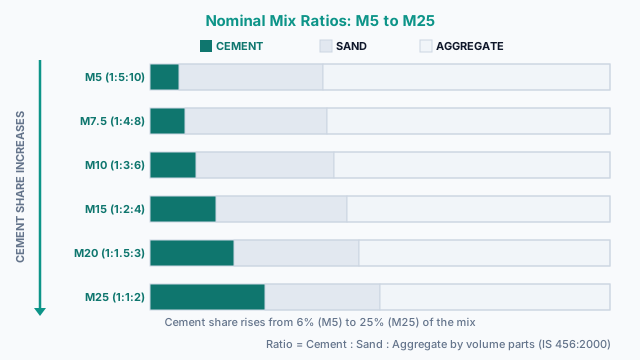
Nominal mix concrete uses fixed cement-to-sand-to-aggregate ratios standardised across six grades — from M5 lean blinding concrete through M25 for exposed reinforced members. Unlike a laboratory design mix, these proportions are predetermined: IS 456:2000 Table 9 and ACI 211.1 both codify nominal ratios because they cover the vast majority of everyday site work — footings, ground-floor slabs, garden walls, and non-structural fill — without requiring a trial-batch programme. The practical challenge is translating a required wet-concrete volume into dry material masses and bag counts, especially once you account for the bulk-volume increase between dry and wet states (the dry volume factor) and inevitable site wastage. For what each grade and ratio actually means — 1:2:3, 1:2:4, M20/M25, and the water-cement ratio — see our pillar guide on concrete mix ratios.
This calculator handles the complete material breakdown for all six standard grades. Enter your wet volume in m³, ft³, or yd³; the tool applies your chosen dry-volume factor (default 1.54) and wastage percentage, then splits the adjusted dry volume using the grade's C:S:A ratio into cement mass, sand mass, aggregate mass, and a bag count for 25, 40, or 50 kg bags. To cross-check the total batch volume before a ready-mix delivery, use our concrete yards calculator. For fractional-bag ordering across multiple pour areas at the same grade, our concrete bag calculator consolidates bag counts into a single purchase order. For the strength rating printed on a sack, see our note on concrete bag mix ratios; to pick the right product, our guide to choosing the right concrete mix bag; and for the volume you are mixing toward, how to calculate concrete for a slab.
Nominal Mix Grade Reference: Ratios, Yield & Bag Counts (M5–M25)
The six standard nominal grades span from lean blinding layers through lightly reinforced structural members. Use the properties table to confirm which grade matches your structural intent and exposure class. For slab geometry — calculating the wet volume from length, width, and thickness — run those dimensions through our slab concrete calculator first, then feed the volume figure into this tool for the per-grade material split.
Grade properties and applications (IS 456:2000)
| Grade | Ratio (C:S:A) | 28-Day f'c | Max w/c | Typical Application |
|---|---|---|---|---|
| M5 | 1:5:10 | 5 N/mm² | — | Lean blinding layers, sub-base bedding beneath main concrete |
| M7.5 | 1:4:8 | 7.5 N/mm² | — | Mass fill, non-structural levelling and void-filling pours |
| M10 | 1:3:6 | 10 N/mm² | 0.60 | Plain concrete pads, lightly loaded unreinforced walls |
| M15 | 1:2:4 | 15 N/mm² | 0.60 | Unreinforced ground slabs, pavement sub-bases, garden paths |
| M20 | 1:1.5:3 | 20 N/mm² | 0.55 | RCC slabs, beams, columns — mild exposure class |
| M25 | 1:1:2 | 25 N/mm² | 0.50 | Exposed foundations, retaining walls, water-retaining structures |
Material quantities per 1 m³ wet concrete (dry factor 1.54, zero wastage, 50 kg bags)
| Grade | Cement (kg) | 50 kg Bags | Sand (kg) | Aggregate (kg) | Water (L) at max w/c |
|---|---|---|---|---|---|
| M5 | 139 | 2.8 | 770 | 1,492 | — |
| M7.5 | 171 | 3.4 | 758 | 1,469 | — |
| M10 | 222 | 4.5 | 739 | 1,432 | 133 |
| M15 | 317 | 6.4 | 704 | 1,364 | 190 |
| M20 | 403 | 8.1 | 672 | 1,302 | 222 |
| M25 | 554 | 11.1 | 616 | 1,194 | 277 |
Bulk densities: cement 1,440 kg/m³; sand 1,600 kg/m³; aggregate 1,550 kg/m³. Water column uses IS 456:2000 max w/c per grade (M5/M7.5 unspecified in the standard). Always round bag counts up on site.
Entering Your Nominal Mix M5–M25 Quantities
- 1Select the nominal mix grade. Each preset — M5, M7.5, M10, M15, M20, or M25 — loads the IS 456:2000 C:S:A ratio and the grade's default maximum w/c for that exposure class.
- 2Enter the required wet concrete volume and choose the unit (m³, ft³, or yd³). This is the finished, in-place volume — not the truck delivery volume or the dry-mix volume.
- 3Review the dry volume factor (default 1.54). Increase to 1.57 if your site uses coarse, poorly graded aggregates with high void ratios; use 1.50 for pre-blended or crushed-fines-rich materials.
- 4Set the wastage percentage. Use 3–5% for direct-cast slabs, 5–7% for complex formwork shapes, and 7–10% for pump delivery lines and skip-bucket transfers.
- 5Choose your cement bag size (25 kg, 40 kg, or 50 kg) to get the correct whole-bag count for the cement purchase order.
- 6(Advanced) Adjust bulk densities if your local cement, sand, or coarse aggregate deviates from IS defaults. Enter the measured values in kg/m³ from a bulk density test.
- 7(Advanced) Measure surface moisture in your sand and coarse aggregate with a moisture meter and enter the percentages. The calculator reduces the mixing-water addition by the water already present in the aggregates.
- 8Press Calculate and review the cement bag count, sand mass, aggregate mass, mixing-water quantity, and yd³ ordering helpers in the results panel.
- 9Use Print / Save to export the summary for a purchase order, QC site record, or mix-ticket approval file.
How the Nominal Mix Material Count Is Calculated
- 1) Dry Volume and Wastage ConversionV_dry = V_wet × DryFactor
V_adj = V_dry × (1 + Wastage / 100)
The default dry factor of 1.54 reflects the 35–54% air-void volume in uncompacted dry aggregates. A 5% wastage allowance on a 0.5 m³ slab adds roughly 0.039 m³ of additional material to cover — approximately 3–4 extra kg of cement. - 2) Material Volume Split by Ratio PartsPartsTotal = C + S + A (from the grade's C:S:A ratio)
V_cem = (C / PartsTotal) × V_adj
V_sand = (S / PartsTotal) × V_adj
V_agg = (A / PartsTotal) × V_adj
For M20 (1:1.5:3), PartsTotal = 5.5 and cement takes 18.2% of the adjusted dry volume. For M25 (1:1:2), PartsTotal = 4 and cement rises to 25% — nearly 40% more cement per m³ than M20. - 3) Mass and Bag CountMass_X (kg) = V_X (m³) × ρ_X (kg/m³)
Bags = ⌈ Mass_cem / BagSizeKg ⌉ (always rounded up to nearest whole bag)
Default bulk densities: cement 1,440 kg/m³; sand 1,600 kg/m³; coarse aggregate 1,550 kg/m³. These are loose bulk densities, not specific gravity values — they reflect real stockpile conditions. - 4) Water Quantity and Moisture AdjustmentWater_theory (litres) = (w/c) × Mass_cem
WaterFromAgg = (MC_sand / 100) × Mass_sand + (MC_agg / 100) × Mass_agg
Water_add = max(Water_theory − WaterFromAgg, 0)
Surface moisture in wet aggregates contributes free water to the effective w/c. If WaterFromAgg exceeds Water_theory, no additional mixing water is needed — only admixtures should then adjust workability, not added water.
Worked Takeoff: M20 Concrete for a 0.5 m³ Garden Slab
Inputs: Grade M20 (1:1.5:3) · wet volume 0.5 m³ · dry factor 1.54 · 5% wastage · 50 kg bags
- Dry volume: 0.5 × 1.54 = 0.77 m³
- With 5% wastage: 0.77 × 1.05 = 0.809 m³ adjusted dry volume
- Total ratio parts: 1 + 1.5 + 3 = 5.5
- Cement volume: (1 ÷ 5.5) × 0.809 = 0.147 m³ → mass = 0.147 × 1,440 = 211.7 kg → 5 bags (4.23 rounded up)
- Sand volume: (1.5 ÷ 5.5) × 0.809 = 0.221 m³ → mass = 0.221 × 1,600 = 353 kg
- Aggregate volume: (3 ÷ 5.5) × 0.809 = 0.441 m³ → mass = 0.441 × 1,550 = 683 kg
- Mixing water (w/c = 0.55): 0.55 × 211.7 = 116 litres
Purchase 5 bags of cement (never 4 — the 0.23 bag overage is your safety margin against drum losses), 360 kg sand, and 700 kg of 20 mm aggregate. If your sand feels surface-damp at roughly 2% moisture, subtract 0.02 × 353 = 7 litres from the 116-litre mix-water figure. For a project with multiple pours at the same grade, the bags per yard calculator lets you consolidate the total bag count across all areas before ordering.
Waste & Rounding Pitfalls in Nominal Mix Batching
- ✕Using wet volume as the dry-mix volume
Forgetting to apply the 1.54 dry factor means ordering roughly 35% less material than required. Dry aggregates contain 35–54% air voids that collapse under compaction; without the factor, the mix runs short mid-pour.
- ✕Ignoring surface moisture in aggregates
Site-damp sand at 3–5% moisture content can carry 10–20 litres of entrained water per m³. Adding the full theoretical mix-water on top overwets the batch, raising the effective w/c and reducing 28-day strength by up to 15%.
- ✕Applying nominal mix to structural reinforced concrete
IS 456:2000 restricts nominal mix to minor structural and non-structural work. Columns, beams, and foundations in Moderate or Severe exposure classes require a verified design mix with cube test results at 7 and 28 days. Using nominal M20 without cube testing risks actual strength being 10–20% below the nominal 20 N/mm² value.
- ✕Rounding bag counts down instead of up
A result of 4.23 bags means 5 bags must be on site — never 4. Running short mid-pour and adding an emergency bag after the first batch has started setting creates a cold joint that is weaker than either lift independently.
When to Use the Nominal Mix Calculator vs. Related Tools
Use this calculator when you know your grade (M5–M25), are batching on-site from dry materials, and need a purchase list with bag count and constituent masses. If you are ordering a ready-mix truck and only need a cubic-yard volume from slab dimensions, our concrete yards calculator gives you that number directly without requiring a C:S:A split. If you are working entirely with pre-bagged concrete mixes (e.g., 60-lb Quikrete or 80-lb Sakrete) and simply need a bag count per square footage, the concrete bag calculator is the faster route. For projects with multiple pour elements — a slab, footings, and columns each at a different grade — run each element through this tool separately and sum the totals for the consolidated purchase order.
Product Standards & Specs
Table 9 defines the six nominal mix grades (M5–M25) with their C:S:A ratios and maximum water–cement ratios by exposure class. This calculator uses IS 456 Table 9 as its grade preset source and the w/c compliance check threshold.
Provides the North American equivalent of nominal mix proportioning, including the absolute volume method and dry-volume correction factors that form the theoretical basis for this calculator's material-split formulas.
When nominal mix proportions inform a ready-mix order, ASTM C94 governs batching tolerances, delivery time limits (90 minutes or 300 drum revolutions), and slump acceptance criteria at the point of discharge.
Governs particle size distribution, surface moisture limits, and bulk density testing methods for fine and coarse aggregates used in nominal mix concrete — the source of the default density values used in this calculator.
Nominal mixes (M5–M20) are permitted only for minor structural work per IS 456:2000 Table 9. For reinforced concrete members in Moderate or Severe exposure classes, use a verified design mix with cube test certificates and consult a licensed structural engineer for project-specific requirements.
Quantity & Ordering Questions
What is a nominal mix concrete calculator?
A nominal mix concrete calculator converts a required wet concrete volume into dry material quantities — cement bags, sand mass, aggregate mass, and water — using the standard IS 456:2000 C:S:A ratios for grades M5 through M25. It applies the dry volume factor to account for voids in uncompacted aggregates, adds your wastage percentage, and outputs a field-ready purchase list. It is the most practical planning tool for site-batched concrete without a formal design-mix programme.
How does the M5–M25 calculator work?
You enter the wet concrete volume and select a grade. The tool multiplies by the dry volume factor (default 1.54) to get the uncompacted dry-mix volume, then adds your wastage percentage to get the adjusted volume. It divides this adjusted volume by the grade's total C:S:A parts and allocates each constituent fraction. Those volumes are multiplied by bulk density (kg/m³) to give masses, and the cement mass is divided by your chosen bag size to give a whole-bag count.
What are the standard mix ratios for each nominal grade?
Per IS 456:2000 Table 9: M5 = 1:5:10, M7.5 = 1:4:8, M10 = 1:3:6, M15 = 1:2:4, M20 = 1:1.5:3, M25 = 1:1:2. M20 is the most commonly used grade for reinforced slabs, beams, and columns in mild exposure. M25 is the minimum grade for moderate exposure conditions — retaining walls, piers, and below-ground elements.
What is the dry volume factor and why is 1.54 the default?
When cement, sand, and aggregate are measured loose in a dry state, they contain roughly 35–54% air voids by volume. When mixed with water and vibrated into formwork, those voids collapse and the volume reduces to the finished concrete volume. A dry factor of 1.54 means 1.54 m³ of loose dry materials produces approximately 1 m³ of finished concrete. Field practice uses values from 1.50 (pre-blended or well-graded aggregates) to 1.57 (coarse or poorly graded materials).
What's the difference between nominal mix and design mix concrete?
Nominal mix uses fixed C:S:A ratios from IS 456 Table 9 — quick, no lab testing required, suitable for minor works. Design mix is engineered for a target 28-day characteristic compressive strength (f'ck) through a trial-batch programme that optimises aggregate grading, cement content, admixtures, and water. IS 456:2000 restricts nominal mix to minor structural and non-structural work; for any element carrying significant load — especially in moderate or severe exposure — a design mix with cube test certificates is required.
Which grade should I use for a house floor slab?
M15 (1:2:4) is the minimum for unreinforced ground slabs per IS 456:2000. For reinforced ground-floor slabs that carry wall and column loads, use M20 (1:1.5:3) as the standard grade. M25 is warranted for heavily loaded industrial floors, basement slabs in contact with groundwater, or slabs in moderate exposure. For the slab geometry, use our slab concrete calculator to get the wet volume, then enter it here for the material breakdown.
How many 50 kg bags of cement does M20 concrete need per cubic metre?
For M20 (1:1.5:3) at dry factor 1.54 and no wastage: cement volume = (1/5.5) × 1.54 = 0.28 m³; mass = 0.28 × 1,440 = 403 kg; bags = 403 ÷ 50 = 8.06, rounded up to 9 bags per m³. With a standard 5% wastage allowance, the cement mass rises to 423 kg — order 9 bags per m³ for a direct-cast slab and 10 bags per m³ when pumping.
Why does entering moisture percentages for sand and aggregate reduce the water quantity?
Sand and aggregate from site stockpiles often carry surface moisture at 2–5% of their dry mass. This free moisture acts as part of the mix water when the materials are batched. If you add the full theoretical mixing water on top of this entrained moisture, the actual water–cement ratio exceeds the design value, weakening the concrete. The calculator subtracts the moisture contribution (MC% × aggregate mass) from the theoretical mix-water quantity so the effective w/c stays at the intended value.
What wastage percentage should I add for a standard slab pour?
For a flat ground slab poured directly from a mixer or truck: 3–5% covers typical spill and edge-trimming losses. Pours via pump or skip crane: add 5–7% for line losses and drum residuals. Complex formwork shapes with rebates and tapers: 7–10%. Site-mixed concrete in wheelbarrows typically loses an additional 2–3% compared to a direct-discharge pour due to spillage during transit and mixer-drum residue.
Can nominal mix concrete be used for structural members like columns and beams?
IS 456:2000 restricts nominal mix to minor structural work only. Columns, beams, and footings in exposure class Mild or above require a verified design mix with cube test results at 7 and 28 days. Using nominal M20 for a column without cube testing risks the actual compressive strength being 10–20% below the nominal 20 N/mm² characteristic value, which can compromise structural safety and will likely fail inspection.
What is the maximum w/c ratio for M20 and M25 per IS 456?
IS 456:2000 Table 5 sets: M20 — maximum w/c = 0.55 (mild exposure); M25 — maximum w/c = 0.50 (moderate exposure). These are upper limits imposed by durability requirements, not targets — reducing the w/c below these values increases both strength and durability. This calculator raises an amber compliance warning if your entered w/c exceeds the IS 456 maximum for the selected grade.
What is the difference between M20 and M25 concrete?
M20 (1:1.5:3) delivers a 20 N/mm² characteristic compressive strength at 28 days; M25 (1:1:2) delivers 25 N/mm². The higher cement content in M25 — approximately 554 kg vs. 403 kg per m³ (roughly 38% more) — provides greater strength, lower permeability, and better resistance to chemical attack. M20 is the economical choice for sheltered structural elements; M25 is the minimum for moderate exposure conditions such as retaining walls, basement floors, and bridge piers.
Why is M5 concrete used, and when should I avoid it?
M5 (1:5:10) at 5 N/mm² is used exclusively as lean blinding concrete — a thin 50–75 mm layer cast over excavated soil to provide a clean, level surface for placing main reinforcement. Its very low cement content (only 2.8 bags of 50 kg per m³) makes it wholly unsuitable for any load-bearing element, reinforced member, or application requiring resistance to moisture and chemical attack. Never specify M5 for structural work.
Is this calculator free to use?
Yes — completely free, with no registration, no login, and no feature paywall. The full calculator including all six grade presets, moisture corrections, editable densities, bag count by bag size, and print functionality is available to all users at no cost.
Can I print or save my nominal mix estimate?
Yes. Press the Print / Save button in the results panel to open an A4-formatted printout showing all inputs (grade, volume, dry factor, wastage, bag size), the complete material breakdown (cement bags, sand mass, aggregate mass, mixing water), and ordering quantities. In your browser's Print dialog, choose 'Save as PDF' to keep a digital copy for purchase orders, mix-ticket records, or site QC documentation.
Related Calculators
Mortar Calculator
Estimate 80 lb, 60 lb, and 40 lb mortar bag counts for block walls, brick veneer, and stone veneer with ASTM C270 type selection and waste allowance.
Concrete Bag Calculator by Project
Turn slab, footing, post hole and sonotube dimensions into an exact bag count — five shape modes, imperial or metric, with +5%/+10% waste buffers.
Concrete Yards Calculator
Convert and compute volume into cubic yards.
Concrete Cubic Meter Calculator
Metric-first concrete calculator — enter dimensions in m / cm / mm to get volume in m³, weight in kg, and bag counts for 20 / 25 / 40 kg pre-mix bags.
Concrete Block Calculator
Estimate concrete blocks, mortar, grout, reinforcement, and cost for CMU block walls.