How to Calculate Concrete for a Slab
A concrete slab is the most common poured flatwork in residential and commercial construction — patios, garage floors, driveways, shed pads, sidewalks, and warehouse floors are all slabs on ground. What makes slab estimating deceptively easy to get wrong is that the slab spreads a thin layer over a large footprint: thickness is the smallest of the three dimensions, yet it controls the volume directly. A half-inch of over-excavation or a dished sub-base that you never measured adds up fast — across a 400 ft² floor, a single extra half-inch of depth is roughly 0.6 yd³ of unplanned concrete. Because ready-mix is sold and delivered in fixed increments and a short pour means a cold joint, getting the depth assumption right matters more than getting the length and width right.
This calculator takes the slab length, width, and thickness — each in its own unit (feet, yards, meters, inches, or centimeters) — and returns the footprint area plus the pour volume in your choice of m³, yd³, ft³, or in³. Built-in +5% and +10% overage tiles sit next to the base volume, and a dedicated cubic-yard ordering panel lists Required, +5%, and +10% quantities — the exact figures a ready-mix dispatcher needs, regardless of the display unit you chose above — plus guidance for rounding up to the 0.5 or 1.0 yd³ increments suppliers actually deliver. Break an L-shaped or stepped slab into rectangles and sum the per-section results, print or save the summary as a PDF for your records, and jump straight to the monolithic slab calculator if the pour ties into a perimeter footing. The volume math, unit factors, and thickness guidance are reviewed by Engr. Muhammad Qasim (Registered Civil Engineer, PEC No. 63430) for technical accuracy.
For a slab that ties into a perimeter footing, pair it with the monolithic slab calculator; to price the pour, use the concrete slab cost calculator. For the full step-by-step method behind these numbers — formula, unit handling, and a complete worked example — read our guide on how to calculate concrete for a slab.
Worked Example: A 20 × 15 ft Patio Slab
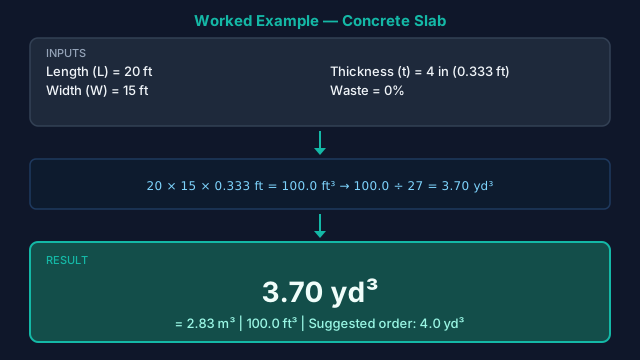
Suppose you are pouring a rectangular patio that is 20 ft long, 15 ft wide, and 4 in thick. Start with the footprint area: 20 ft × 15 ft = 300 ft². Convert the thickness to feet — 4 in ÷ 12 = 0.333 ft — then multiply by the area to get the raw volume: 300 ft² × 0.333 ft = 100 ft³. Divide by 27 to convert to cubic yards: 100 ft³ ÷ 27 = 3.70 yd³. That is the bare minimum, and it assumes a perfectly flat sub-base — which never happens. Applying the +10% overage tile gives 3.70 × 1.10 = 4.07 yd³, so you would order 4.25 yd³ (rounding up to the supplier's quarter-yard increment). If you were placing this slab by bag instead of ready-mix, 100 ft³ ÷ 0.60 ft³ works out to about 167 eighty-pound bags — clear evidence that anything above ~1 yd³ is faster and cheaper as a ready-mix delivery.
How to Run the Slab Concrete Calculator
- 1In Step 1 — Choose Units, set the unit for length, width, and thickness independently. A common setup is feet for length and width and inches for thickness; the calculator converts all three to a common base before multiplying.
- 2In Step 2 — Core Dimensions, enter the slab Length (L) — the longer plan dimension of the footprint. For a rectangular driveway this is the run from garage to street.
- 3Enter the slab Width (W) — the shorter plan dimension. For a two-car driveway this is typically 18–24 ft.
- 4Enter the slab Thickness (T) — the uniform pour depth. Use 4 in (10 cm) for patios and walkways, 5–6 in (13–15 cm) for driveways and garage floors, and the engineer's figure for load-bearing floors.
- 5In Step 3 — Output Units, choose how to display the Area (ft², m², yd²) and the Volume (yd³ for US ready-mix ordering, or m³ for metric documentation).
- 6Press Calculate. The results panel returns the footprint Area and the pour Volume in your chosen units.
- 7Read the +5% and +10% overage tiles next to the base volume — order toward the +10% figure for uneven sub-grade or hand-screeded pours, and toward +5% for a well-prepared, laser-screeded base.
- 8Use the Cubic Yards (for ordering) panel — it lists Required, +5%, and +10% in yd³ regardless of your display unit. This is the number to give your ready-mix supplier.
- 9Round the ordering figure up to your supplier's delivery increment (commonly 0.25, 0.5, or 1.0 yd³) to avoid a short-load fee on a partial truck.
- 10For an L-shaped, T-shaped, or stepped slab, split it into rectangles, run each rectangle separately, and add the cubic-yard results before ordering.
- 11Click Print / Save to open a branded summary of inputs and results, then choose Save as PDF in your browser's print dialog to keep an ordering record.
The Slab Volume Formula
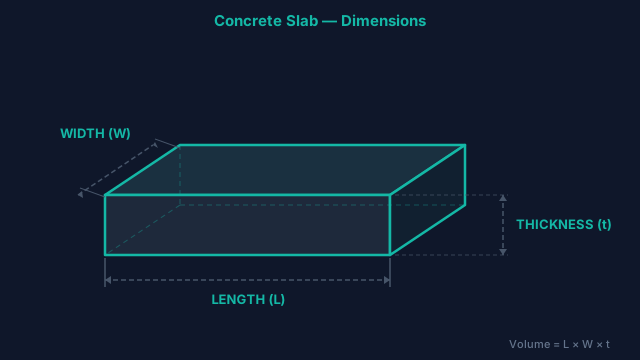
- 1) Slab Footprint AreaArea = Length × Width
Length and width are converted to a common base unit (meters internally) before multiplying. This is the plan-view area of the slab, independent of thickness. - 2) Core VolumeVolume = Length × Width × Thickness = Area × Thickness
All three dimensions are reduced to the same base unit before multiplying, so mixing feet for length and inches for thickness is handled automatically. Thickness is the multiplier that scales the whole pour — a 4 in vs 5 in choice changes the order by 25%. - 3) Unit Conversions1 ft = 12 in | 1 m = 100 cm = 1000 mm | 1 yd³ = 27 ft³ | 1 m³ ≈ 1.30795 yd³
Cubic yards are the standard ready-mix ordering unit in the United States; cubic meters are used for metric project documentation. - 4) Overage / Waste AllowanceAdjusted Volume = Base Volume × (1 + Waste%)
The calculator pre-computes the +5% and +10% cases. Use 5% for a laser-screeded slab on a compacted, formed base; 10% when the sub-grade is uneven or screeding is done by hand. - 5) Cubic Yards for OrderingCubic Yards = Volume (ft³) ÷ 27
Reported as Required, +5%, and +10% so you can round up to the supplier's delivery increment without re-doing the math. - 6) Pre-Mix Bag Estimate (reference)Bags = Volume (ft³) ÷ Bag Yield (ft³)
Yields: 80 lb → 0.60 ft³ (≈ 45 bags/yd³); 60 lb → 0.45 ft³ (≈ 60 bags/yd³); 40 lb → 0.30 ft³. Bags are practical only for small slabs; for the full bag breakdown by dimensions use the concrete bag calculator, or convert a known volume directly with the bags-per-yard calculator.
Typical Slab Thickness, Strength & Reinforcement
Thickness is the single biggest lever on how much concrete you order — and it is set by what the slab has to carry, not by preference. The table below lists typical slab-on-ground thicknesses by application, the concrete compressive strength commonly specified, the usual reinforcement, and the resulting concrete volume per 100 ft² of floor. Use it to sanity-check both your thickness input and your final order. Once the thickness and reinforcement style are settled, size the actual sheet or roll count with the wire mesh calculator.
| Application | Typical Thickness | Strength | Reinforcement | yd³ / 100 ft² |
|---|---|---|---|---|
| Walkway / garden path | 3.5–4" (90–100 mm) | 3,000 psi | Fiber mesh or 6×6 WWM (optional) | 1.08–1.23 |
| Patio | 4" (100 mm) | 3,000–3,500 psi | 6×6 W1.4 welded wire mesh | 1.23 |
| Residential driveway | 4–5" (100–125 mm) | 3,500–4,000 psi | #3 rebar @ 18" O.C. or WWM | 1.23–1.54 |
| Garage / shop floor | 5–6" (125–150 mm) | 4,000 psi | #4 rebar @ 16" O.C. | 1.54–1.85 |
| Light warehouse / commercial floor | 6–8" (150–200 mm) | 4,000–4,500 psi | Engineered rebar mat | 1.85–2.47 |
Volumes use Volume = 100 ft² × (thickness ÷ 12) ÷ 27. Reinforcement is typical practice only; control-joint spacing, rebar size, and slab thickness for load-bearing work must follow the structural drawings.
US PSI vs. Metric C-Class Strength
US specifications give slab concrete a 28-day compressive strength in pounds per square inch — most flatwork is 3,000, 3,500, or 4,000 psi. Metric and European projects use a C-class instead, written as cylinder/cube strength in MPa: 3,000 psi ≈ 20 MPa (≈ C20/25), 3,500 psi ≈ 24 MPa, and 4,000 psi ≈ 28 MPa (≈ C25/30) — C25/30 being the most common metric slab spec. The volume math is identical in either system; only the unit you enter for thickness and the strength callout on your drawings change. If you are working from metric plans, set the thickness unit to centimeters and the volume output to m³ and the calculator handles the rest.
Ordering Mistakes That Leave a Slab Pour Short
- Ignoring sub-base dips. The calculator assumes a flat base. A sub-grade that sags even ½ in below grade across a large floor quietly adds tenths of a yard — this is the number-one cause of running short mid-pour. Order toward the +10% tile when the base is hand-graded.
- Forgetting the thickened edge or footing. Many slabs have a turned-down perimeter or sit on a footing. The plain L × W × T volume excludes that extra concrete — use the monolithic slab calculator when the edge is thickened.
- Mixing units carelessly. Entering thickness in inches while the field is set to centimeters (or vice-versa) throws the volume off by ~2.5×. Confirm the unit badge inside each input before pressing Calculate.
- Ordering the exact computed volume. Concrete is unforgiving — a short load means a cold joint. Always carry 5–10% overage and round up to the supplier's delivery increment.
Pairing the Slab Calculator with Other Tools
Reach for this slab calculator whenever you need the volume of a uniform-thickness slab on ground. If your project is a specific flatwork shape, a purpose-built tool gives cleaner presets: a concrete patio calculator for patios, a sidewalk calculator for long narrow walks, or a pad calculator for equipment pads. When the slab integrates a perimeter footing, switch to the monolithic slab calculator. To go beyond volume: the slab cost calculator prices the pour, the slab weight calculator returns dead load, and the load capacity calculator checks what the slab can carry. For a pure unit conversion, the concrete yards calculator covers it. If the design calls for welded wire fabric rather than rebar, size the sheet or roll order with the wire mesh calculator. For background reading, see our worked 10×10 slab example, the guide to reinforcing a concrete slab, and our breakdown of how much a concrete slab costs.
Mix & Placement Standards
The primary ACI guide for slab-on-ground construction. It governs the sub-base preparation, slab thickness selection, jointing, and finishing decisions that determine whether your volume estimate holds up in the field.
Covers thickness design for loading, sub-grade modulus, joint spacing, and reinforcement for slabs on ground — the basis for the thickness recommendations in the guide table above.
Governs how the ready-mix you order for a slab is batched, mixed, transported, and delivered — including the 90-minute / 300-revolution discharge limit that makes a correctly sized single order important.
Slab volume estimates do not account for sub-base compaction depth, isolation joint thickness, or grade-beam integration; confirm slab thickness, control-joint spacing, and minimum reinforcement with a licensed structural engineer before forming any load-bearing slab.
Slab Concrete — Questions Before You Order
How do I calculate concrete for a slab?
Multiply length × width × thickness, with all three in the same unit, then convert to cubic yards by dividing the cubic-foot result by 27. For example, a 20 × 15 ft slab at 4 in thick is 20 × 15 × (4 ÷ 12) = 100 ft³ ÷ 27 = 3.70 yd³. This calculator does the unit conversion for you, so you can enter length and width in feet and thickness in inches directly.
How thick should a concrete slab be?
Patios and walkways are typically 4 in (100 mm), residential driveways 4–5 in (100–125 mm), garage and shop floors 5–6 in (125–150 mm), and light commercial or warehouse floors 6–8 in (150–200 mm). Thickness is driven by the load the slab carries, not preference — always defer to the structural drawings for load-bearing slabs.
How many cubic yards of concrete do I need for a 20×20 slab?
A 20 × 20 ft slab is 400 ft² of footprint. At 4 in thick that is 400 × (4 ÷ 12) = 133.3 ft³ ÷ 27 = 4.94 yd³; at 6 in thick it rises to 7.41 yd³. Add 5–10% overage, so you would order roughly 5.25 yd³ for the 4 in slab or 8 yd³ for the 6 in slab.
How much concrete do I need for a 24×24 garage slab?
A 24 × 24 ft garage floor is 576 ft². At the recommended 5 in thickness that is 576 × (5 ÷ 12) = 240 ft³ ÷ 27 = 8.89 yd³, and at 6 in it is 10.67 yd³. With a 5% overage on the 5 in slab you would order about 9.33 yd³ — round up to the supplier's increment, typically 9.5 yd³.
What is the difference between slab area and slab volume?
Area is the flat footprint of the slab — length × width — measured in square feet or square meters, and it tells you how much surface you are covering. Volume adds the thickness — length × width × thickness — measured in cubic yards or cubic meters, and it is what you actually order concrete by. This calculator reports both so you can verify the geometry before ordering.
What concrete strength (PSI) should a slab be?
Most residential flatwork uses 3,000–3,500 psi; driveways and garage floors commonly call for 3,500–4,000 psi; commercial floors 4,000 psi or more. In metric terms, 3,000 psi ≈ 20 MPa (≈ C20/25) and 4,000 psi ≈ 28 MPa (≈ C25/30). The strength affects the mix you order, not the volume — volume depends only on the dimensions.
How much extra concrete should I order for waste?
Carry 5–10% above the calculated volume. Use 5% for a laser-screeded slab on a well-compacted, formed sub-base, and 10% when the base is hand-graded or the screeding is manual. The calculator shows the +5% and +10% figures next to the base volume so you can pick the right one and round up to the supplier's delivery increment.
Do I need rebar or wire mesh in a slab?
Patios and walkways often use only fiber mesh or a single layer of 6×6 welded wire mesh for crack control. Driveways typically add #3 rebar at 18 in on center, and garage or shop floors #4 rebar at 16 in on center. Reinforcement controls cracking and load transfer but does not change the concrete volume — size and spacing should follow the structural drawings.
How many 80 lb bags of concrete do I need for a slab?
An 80 lb bag yields about 0.60 ft³, so one cubic yard (27 ft³) takes roughly 45 bags; a 60 lb bag yields 0.45 ft³, or about 60 bags per yard. Bagged concrete is practical only for small slabs — a 4 in patio of about 1.5 yd³ would need around 67 eighty-pound bags. For anything larger, ready-mix is faster and cheaper. The concrete bag calculator gives the full bag breakdown.
Can I use this calculator for a metric slab specified as C25/30?
Yes. Set the length and width units to meters and the thickness unit to centimeters, then choose m³ as the volume output. The C25/30 designation is a strength class (≈ 4,000 psi / 28 MPa) that affects the mix you order, not the volume — the calculator computes the same length × width × thickness regardless of strength class.
How do I calculate concrete for an L-shaped or irregular slab?
Break the shape into rectangles, calculate each rectangle's volume separately, then add the cubic-yard results before ordering. For an L-shaped patio, split it into two rectangles along the inside corner. Apply your overage allowance to the combined total, not to each piece, and round the final figure up to the delivery increment.
What is the minimum slab thickness for a driveway?
A residential driveway for passenger vehicles should be at least 4 in (100 mm) of concrete over a compacted base, with 5 in (125 mm) recommended where heavier vehicles, RVs, or freeze-thaw cycles are involved. Thinner slabs crack under wheel loads at the edges. Local codes and the soil's bearing capacity can require more, so confirm against your jurisdiction's standards.
Should I include the footing or thickened edge in my slab estimate?
Not with this calculator — it computes a uniform-thickness slab (length × width × thickness) and excludes any turned-down edge, perimeter footing, or grade beam. If your slab has an integral thickened edge poured monolithically, use the monolithic slab calculator, which adds the footing volume to the slab volume in one estimate.
How long before I can use a new concrete slab?
Concrete reaches about 70% of its design strength in 7 days and full 28-day strength after a month. As a rule of thumb you can walk on a slab after 24–48 hours, drive passenger vehicles on a driveway after 7 days, and apply full loads after 28 days. Keep the slab moist-cured for at least the first 7 days to limit shrinkage cracking.
Does this calculator account for reinforcement or mix design?
No — it calculates concrete volume only. Rebar, welded wire mesh, fiber dosage, air content, and mix design are specified by your engineer or local code and do not change the volume of concrete you pour. Use the volume figure here to order ready-mix, and follow the structural drawings for everything that goes into and on top of the slab.
Related Calculators
Concrete Bag Calculator by Project
Turn slab, footing, post hole and sonotube dimensions into an exact bag count — five shape modes, imperial or metric, with +5%/+10% waste buffers.
Concrete Slab Cost Calculator
Estimate cost of concrete for slabs, patios, and floors.
Concrete Slab Weight Calculator
Estimate weight of concrete for slabs, patios, and floors.
Concrete Pad Calculator (AC, Shed, Hot Tub, Generator)
Estimate concrete volume, bag counts, and cost for small equipment pads — AC unit, shed, hot tub, and generator presets included.
Concrete Patio Calculator
Estimate concrete volume, bags, and cost for slabs, patios, and floors.
Concrete Sidewalk Calculator
Estimate concrete volume, bags, and cost for slabs, patios, and floors.