Calculating Concrete Volume in Metric Units
The concrete cubic meter calculator converts metric project dimensions — entered in metres, centimetres, or millimetres — into concrete volume in m³ and then into weight in kilograms and metric bag counts for 20 / 25 / 40 kg pre-mix bags. Whether you are ordering ready-mix concrete in a country that quotes by the cubic metre, estimating bag quantities from a metric materials list, or simply need your yd³ result expressed in SI units, this tool puts metric outputs first without forcing you to do any unit-conversion arithmetic. For the full set of cubic-yard, cubic-foot, and cubic-meter conversions, see our pillar guide to concrete volume conversions.
The calculator accepts three concrete types — normal weight (2,400 kg/m³ per ACI 318), lightweight ACI 213R concrete (1,762 kg/m³), and pre-mix bag concrete (2,130 kg/m³) — all drawn from the shared density table used by every calculator on this site so constants are never duplicated. Outputs include m³ volume, kg/t weight, metric bag counts, and US lb bag counts (in Advanced mode), plus equivalent ft³ and yd³ values for cross-border coordination. For weight in kilograms and tonnes, see our reference on how much concrete weighs; for a worked slab example, our guide on how to calculate concrete for a slab; and to estimate sacks, our guide to estimating bags of concrete.
Three project presets — Slab (6 × 6 × 0.15 m), Strip Footing (10 × 0.4 × 0.5 m), and Column (0.3 × 0.3 × 3.5 m) — load sensible starting values in seconds, and each dimension field carries its own independent unit selector (m / cm / mm / ft / in) so a drawing that mixes metres and millimetres still computes correctly. Quick mode keeps the results panel to volume, weight, and metric bag counts; Advanced mode adds US lb bag counts and the density / volume reference cards, plus an ACI 302.1R compliance note for pours over 15 m³. Every result links directly to the concrete yards calculator and concrete weight calculator, and a Print / Save button exports a clean PDF summary of every input and output.
Worked Example: A 10 m Strip Footing Pour
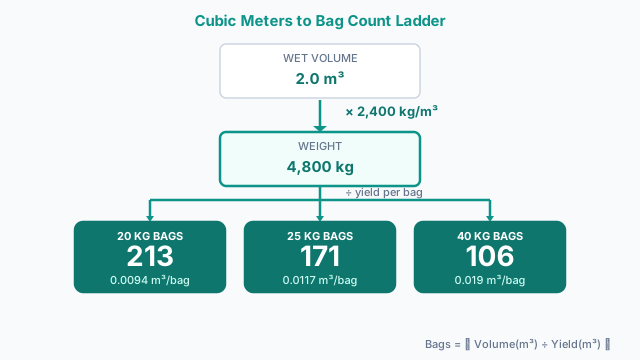
Consider a strip footing for a boundary wall — the calculator's own Strip Footing preset: 10 m long, 0.4 m wide, and 0.5 m deep. Volume is straightforward multiplication: 10 × 0.4 × 0.5 = 2.0 m³. Converted for cross-checking against imperial drawings: 2.0 × 35.3147 = 70.6 ft³, and 2.0 × 1.30795 = 2.62 yd³.
At the normal-weight density of 2,400 kg/m³, the footing weighs 2.0 × 2,400 = 4,800 kg, or 4.8 metric tons. If you are supplying the pour with bagged pre-mix instead of a ready-mix truck, the bag counts follow the same ceiling-rounded formula the calculator uses: 20 kg bags need ⌈2.0 ÷ 0.0094⌉ = 213 bags; 25 kg bags need ⌈2.0 ÷ 0.0117⌉ = 171 bags; and 40 kg bags need ⌈2.0 ÷ 0.019⌉ = 106 bags — the same figures listed against the 2.0 m³ row in the reference table below.
That 2.0 m³ is still the theoretical volume. Footings poured against trench walls lose some material to formwork gaps, over-excavation, and sub-grade irregularity, so many crews add a 5–10% ordering allowance on top of it — the same buffer concept ready-mix buyers apply on the imperial side of an order (see the concrete yards calculator for that equivalent). A 5–10% allowance raises this footing's practical order to roughly 2.1–2.2 m³ — round up to whatever load size your local plant offers.
Entering Your Cubic Meter Dimensions
- 1Select Quick for a straightforward m³ result, or Advanced to also reveal US lb bag counts and the density / volume-conversion reference cards.
- 2Choose a project type preset — Slab / Floor, Footing / Wall, or Column / Pier — to pre-load sensible metric dimensions. Override any field if your actual dimensions differ.
- 3Select your input mode: Dimensions (L × W × D) to enter physical measurements, or Volume to type a known m³, ft³, or yd³ value directly.
- 4Enter your dimensions in the metric units that match your drawings: metres (m), centimetres (cm), or millimetres (mm). You can also select ft or in per field if your drawings mix systems.
- 5Select the concrete type: Normal Weight (2,400 kg/m³ per ACI 318), Lightweight (1,762 kg/m³ per ACI 213R), or Bag Mix (2,130 kg/m³).
- 6Press Calculate. The results panel updates immediately with volume in m³, ft³, and yd³; weight in kg, metric tons, lb, and short tons; and metric bag counts.
- 7Read the Metric Bag Counts section for how many 20 kg, 25 kg, and 40 kg bags you need, each rounded up to the next whole bag.
- 8Check the Weight section for kilograms and metric tons — useful for structural dead-load checks, truck weight limits, and concrete pump capacity calculations.
- 9Enable Advanced mode to view the equivalent US lb bag counts (40 / 50 / 60 / 80 lb) and the density and volume-conversion reference cards.
- 10Click Print / Save after calculating to export a clean PDF-ready summary of all inputs, volumes, weights, and bag counts for your project records.
The Cubic Meter Volume Formula
- 1) Rectangular volumeVolume (m³) = Length (m) × Width (m) × Depth (m)
All dimension inputs are converted to metres before multiplication. For example, 600 cm is treated as 6 m, and 150 mm as 0.15 m. - 2) Weight from volumeWeight (kg) = Volume (m³) × Density (kg/m³)
Density constants: normal weight = 2,400 kg/m³ (ACI 318), lightweight = 1,762 kg/m³ (ACI 213R), bag mix = 2,130 kg/m³. Metric tons = kg ÷ 1,000. - 3) Metric bag countsBags = ⌈ Volume (m³) ÷ Yield per bag (m³) ⌉
Yields: 20 kg → 0.0094 m³, 25 kg → 0.0117 m³, 40 kg → 0.019 m³. All counts are rounded up (ceiling) to whole bags. - 4) Volume conversionsft³ = m³ × 35.3147 | yd³ = m³ × 1.30795
Inverse: m³ = ft³ × 0.0283168 | m³ = yd³ × 0.764555. All three volume units are shown simultaneously in the results panel.
Common Cubic Meter Volumes at a Glance
The table below shows pre-computed bag counts and weights for common pour volumes — useful as a quick sanity check against the calculator result. All bag counts are rounded up to the next whole bag; weight assumes normal-weight concrete at 2,400 kg/m³.
| Volume | Weight (kg) | Weight (t) | 20 kg bags | 25 kg bags | 40 kg bags | Equiv. yd³ |
|---|---|---|---|---|---|---|
| 0.5 m³ | 1,200 kg | 1.2 t | 54 | 43 | 27 | 0.65 yd³ |
| 1.0 m³ | 2,400 kg | 2.4 t | 107 | 86 | 53 | 1.31 yd³ |
| 2.0 m³ | 4,800 kg | 4.8 t | 213 | 171 | 106 | 2.62 yd³ |
| 3.0 m³ | 7,200 kg | 7.2 t | 320 | 257 | 158 | 3.92 yd³ |
| 5.0 m³ | 12,000 kg | 12.0 t | 532 | 428 | 264 | 6.54 yd³ |
| 10.0 m³ | 24,000 kg | 24.0 t | 1,064 | 855 | 527 | 13.08 yd³ |
| 15.0 m³ | 36,000 kg | 36.0 t | 1,596 | 1,282 | 790 | 19.62 yd³ |
Bag counts rounded up. Weight assumes normal weight concrete (2,400 kg/m³). For lightweight or bag-mix concrete, use the calculator with the appropriate type selected.
Cubic Meter Ordering Mistakes That Leave You Short
- Using the wrong density constant. Normal weight (2,400 kg/m³), lightweight (1,762 kg/m³), and bag-mix (2,130 kg/m³) concrete give materially different weight and bag-count results for the identical m³ figure. Leaving the Concrete Type selector on the default when your project actually uses lightweight mix is the most common source of a mismatched order.
- Leaving one dimension field on the wrong unit. Each of length, width, and depth carries its own independent unit selector (m / cm / mm / ft / in). Entering depth in centimetres while length and width are still in metres silently shifts the volume by a factor of 100 rather than the intended small correction.
- Rounding bag counts down instead of up. The bag yields — 0.0094 m³ per 20 kg bag, 0.0117 m³ per 25 kg bag, 0.019 m³ per 40 kg bag — rarely divide evenly into a real volume. The calculator always rounds up (ceiling) to a whole bag; rounding to the nearest bag by hand instead leaves the pour short.
- Skipping the large-pour compliance check. Any pour exceeding 15 m³ (about 20 yd³) triggers an ACI 302.1R note recommending a pre-pour mix-design review and independent QC testing. On larger commercial or multi-slab jobs it's easy to sum several smaller sections and miss that the combined pour has crossed this threshold.
- Cross-referencing the wrong calculator's bag sizes. This tool's bag counts are 20 / 25 / 40 kg metric bags; the concrete yards calculator's are 40 / 60 / 80 lb US bags. Quoting one calculator's bag count against the other's product line produces an order that doesn't match what's on the supplier's shelf.
Pairing the Cubic Meter Calculator with Other Tools
The Concrete Cubic Meter Calculator is the right tool when your project is dimensioned in metric units (m / cm / mm) or when your supplier quotes in cubic meters. For US-customary projects ordered in cubic yards, the concrete yards calculator is the faster path. To convert the cubic-meter result to a weight for structural dead-load checks or truck-load planning, the concrete weight calculator multiplies any volume by your concrete density. For application-specific pours, the slab concrete calculator and footing concrete calculator include project-type presets. For a US-bag cross-check, the concrete bag calculator covers 40/60/80 lb bags with brand-by-brand yield tables.
Specs & References
Source for the normal-weight concrete density constant of 2,400 kg/m³ (150 pcf) used as the primary density in this calculator.
Source for the lightweight concrete density of 1,762 kg/m³ (110 pcf) used in the Lightweight preset.
Governs how fresh concrete density is measured in the field. The density values in this calculator are consistent with ASTM C138 test methodology for normal-weight concrete.
Basis for the large-pour compliance flag shown when the calculated volume exceeds 15 m³ (≈ 20 yd³), recommending a pre-pour mix-design review and independent QC testing.
Standards cited for reference. Always consult a licensed structural or civil engineer for project-specific design requirements.
Ordering & Volume Questions
What is a concrete cubic meter calculator?
A concrete cubic meter calculator converts project dimensions — entered in metres, centimetres, or millimetres — into concrete volume in m³ and then into weight in kilograms and metric bag counts. This calculator uses ACI 318 density constants (2,400 kg/m³ for normal-weight concrete) and returns all outputs in metric units first, with imperial equivalents alongside.
How does a concrete cubic meter calculator work?
It multiplies length × width × depth to get volume in m³, then multiplies by the concrete density (e.g. 2,400 kg/m³ for normal weight) to get mass in kg. Bag counts are derived by dividing the m³ volume by the yield per bag: 0.0094 m³ per 20 kg bag, 0.0117 m³ per 25 kg bag, and 0.019 m³ per 40 kg bag. All values are rounded up to the next whole bag.
How much does 1 cubic meter of concrete weigh in kg?
One cubic metre of normal-weight concrete weighs 2,400 kilograms (2.4 metric tons) per ACI 318. Lightweight concrete (ACI 213R) is approximately 1,762 kg/m³. Pre-mix bag-mix concrete is approximately 2,130 kg/m³. These density values are sourced from the site's shared, spec-locked density table used by every calculator on this site.
How many 20 kg bags of concrete fill 1 cubic meter?
A 20 kg bag yields approximately 0.0094 m³ of concrete. To fill 1 m³ you need 1 ÷ 0.0094 = 106.4, rounded up to 107 bags. This calculator shows the exact count for your volume automatically.
How many 25 kg bags fill 1 m³ of concrete?
A 25 kg bag yields approximately 0.0117 m³ of concrete. One cubic metre requires 1 ÷ 0.0117 = 85.5, rounded up to 86 bags of 25 kg concrete.
How many 40 kg bags fill 1 m³ of concrete?
A 40 kg bag yields approximately 0.019 m³ of concrete. One cubic metre therefore requires 1 ÷ 0.019 = 52.6, rounded up to 53 bags. The 40 kg bag is the most common large pre-mix size in metric markets and gives the most economical bag count.
How do I convert cubic meters to cubic yards?
Multiply m³ by 1.30795 to get cubic yards. For example, 5 m³ = 5 × 1.30795 = 6.54 yd³. This calculator displays the yd³ equivalent automatically in the Volume section of the results panel.
How do I convert cubic meters to cubic feet?
Multiply m³ by 35.3147 to get cubic feet. For example, 1 m³ = 35.3147 ft³. The calculator shows ft³ alongside m³ and yd³ in all results so you can cross-check against plan-set notes or US product data sheets.
What is the density of concrete in kg/m³?
Normal-weight concrete: 2,400 kg/m³ (ACI 318). Lightweight concrete: approximately 1,762 kg/m³ (ACI 213R). Bag-mix pre-blended concrete: approximately 2,130 kg/m³ (derived from the standard 40 kg bag yield of 0.019 m³). The calculator's Concrete Type buttons switch between these constants automatically.
What dimensions give me 1 cubic meter of concrete?
Any L × W × D combination that multiplies to 1.0 m³. Common examples: a 2 m × 2 m slab 0.25 m thick (2 × 2 × 0.25 = 1.0 m³); a 10 m strip footing 0.5 m wide × 0.2 m deep (10 × 0.5 × 0.2 = 1.0 m³); or a 100 mm × 100 mm column 100 m tall. Use the Dimensions input mode and adjust each field until the result reads 1.000 m³.
How do I calculate concrete for a metric slab?
Select the Slab / Floor preset, then adjust the length, width, and thickness to your actual dimensions in metres or centimetres. A typical residential slab is 150 mm thick (0.15 m). For a 10 m × 8 m slab at 150 mm: 10 × 8 × 0.15 = 12 m³. At 2,400 kg/m³, that is 28,800 kg (28.8 t), requiring 636 × 20 kg bags or 228 × 40 kg bags.
What is the difference between this calculator and the Concrete Yards Calculator?
This calculator is metric-first: dimension inputs default to metres (m/cm/mm), the primary volume output is m³, and bag counts feature 20/25/40 kg metric bags. The Concrete Yards Calculator is yd³-first: dimension inputs use feet, the primary output is cubic yards, and bag counts feature US lb bags. Both calculators use the same shared calculation engine so the math is identical — only the default units and primary outputs differ.
What is the difference between this calculator and the Concrete Weight Calculator?
The Concrete Weight Calculator is weight-out focused — its hero output is total weight in pounds and tons, making it suited for dead-load checks, haul-away estimates, and structural reviews. This calculator is volume-out focused — its hero output is m³, making it suited for ordering concrete and planning pours. Both calculators share the same engine and density table; choose this one when you need metric volume and bag counts, and the weight calculator when weight is the primary deliverable.
Is the calculator free?
Yes — completely free with no sign-up, no account, and no download required. All calculations run locally in your browser.
Can I print or save my estimate?
Yes. After pressing Calculate, click the Print / Save button to open a clean print-optimised page listing all inputs, volume in m³/ft³/yd³, weight in kg/t/lb/tons, and both metric and US bag counts. Select 'Save as PDF' in your browser's Print dialog to keep a digital copy for site records or client deliverables.
Related Calculators
Concrete Yards Calculator
Convert and compute volume into cubic yards.
Concrete Weight Calculator
Convert any concrete volume (yd³, ft³, m³) or pour dimensions to weight in lb, short tons, and kg — with normal-weight, lightweight, and bag-mix presets.
80 lb Bag Concrete Calculator
One 80 lb bag yields 0.60 cu ft — 45 bags per cubic yard. Convert any volume into bag counts, coverage and pallets for 40/50/60/80 lb bags.
Concrete Bag Calculator by Project
Turn slab, footing, post hole and sonotube dimensions into an exact bag count — five shape modes, imperial or metric, with +5%/+10% waste buffers.
Nominal Mix M5-M25 Calculator
Nominal Mix M5-M25 Calculator