How Much Mortar a Block or Veneer Wall Actually Needs
Mortar is the adhesive that binds masonry units together — every block wall, brick façade, and stone veneer installation depends on the right amount of properly mixed mortar. Under-ordering leads to mid-project supply runs and inconsistent joint coloring; over-ordering wastes both material and budget. This free Mortar Calculator takes the guesswork out of your estimate by computing the exact number of premix mortar bags required for block walls, brick veneer, and stone veneer projects, with a configurable waste allowance and optional cost breakdown. For how cement, sand, and water proportions set strength and workability, see our pillar guide on concrete mix ratios.
Enter either your total block count (for CMU block walls) or your wall area in square feet (for brick or stone veneer), select your mortar joint thickness and ASTM C270 mortar type, and set a waste percentage. The calculator instantly returns bag counts for 80 lb, 60 lb, and 40 lb bags. Switch to Advanced mode to add bag pricing and labor cost per bag for a complete installed-cost estimate you can print and take to the job site. To size the wall itself, see our guide on estimating concrete blocks for a wall; for what the strength rating inside a bag means, our note on concrete bag mix ratios; and to budget materials, our overview of how much concrete costs.
Two things distinguish this tool from a generic bag-count chart: it accepts either a block count or a wall area depending on which one you actually have on hand, and it checks your mortar-type selection against ASTM C270 in real time — flagging, for instance, a Type O pick on a structural block wall before you order the wrong mix. Advanced mode adds bag pricing and labor cost for a printable installed-cost estimate.
ASTM C270 Mortar Types — Yield & Coverage Reference
ASTM C270 is the governing standard for mortar for unit masonry in North America. It defines four mortar types — M, S, N, and O — each with a minimum compressive strength, a specific application range, and performance characteristics for bond strength, durability, and workability.
| Type | Min. Strength | Bond Strength | Recommended Use | Not Suitable For |
|---|---|---|---|---|
| Type M | 2,500 PSI | Low | Below grade, retaining walls, manholes, sewers, heavily loaded walls | Brick veneer, interior walls where flexibility is needed |
| Type S | 1,800 PSI | Moderate | Exterior walls at or below grade, structures in contact with soil, high lateral load masonry, pavers | Highly flexible or non-structural applications |
| Type N | 750 PSI | High | Above-grade exterior masonry, interior load-bearing walls, standard CMU, general-purpose brick and block work | Below-grade applications or areas with persistent moisture exposure |
| Type O | 350 PSI | Very High | Interior non-load-bearing partitions, low-exposure decorative veneer, protected interior stone work | Structural walls, exterior applications, or any area subject to freezing and thawing |
Source: ASTM C270 — Standard Specification for Mortar for Unit Masonry. Always consult local building codes and a licensed masonry professional for structural applications.
Entering Your Mortar Project Quantities
- 1Pick a project type — Block Wall, Brick Veneer, or Stone Veneer — then enter your block count or wall area, joint thickness, and ASTM C270 mortar type.
- 2Set a waste allowance (10% for block and brick, 15–20% for stone) and switch to Advanced mode if you want bag pricing and labor cost included.
- 3Press Calculate for 80, 60, and 40 lb bag counts, then use Print / Save if you need a copy for a supplier or job file.
How the Mortar Bag Count Is Calculated
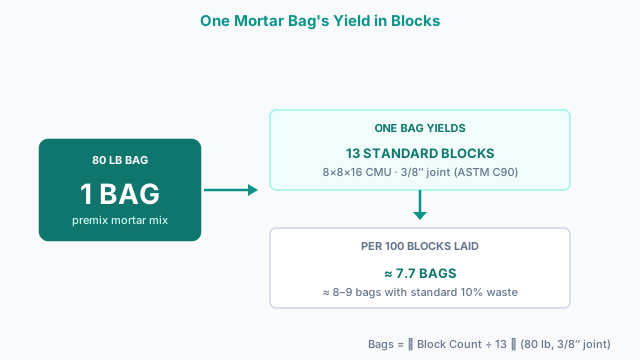
- 1) Block Wall — Bag CountBags (80 lb) = ⌈ Block Count ÷ 13 ⌉
Based on the industry-standard coverage of 13 standard 8×8×16 CMU blocks per 80 lb premix mortar bag, including bed joints and head joints at a nominal 3/8″ thickness. Coverage for 60 lb bags uses 10 blocks/bag and 40 lb bags use 7 blocks/bag, proportional to bag weight. - 2) Brick / Stone Veneer — Bag CountBags (80 lb) = ⌈ (Wall Area ÷ 100) × Coverage Rate ⌉
Coverage rates (80 lb bags per 100 sq ft): Brick at 3/8″ joint = 7 bags, brick at 1/2″ joint = 9 bags, brick at 3/4″ joint = 12 bags. Stone at 3/8″ = 8 bags, stone at 1/2″ = 10 bags, stone at 3/4″ = 14 bags. Stone requires more mortar per area because of less-uniform unit shapes. - 3) Waste FactorTotal Bags = ⌈ Base Bags × (1 + Waste% ÷ 100) ⌉
Mortar loss occurs during mixing (typically 5–10%), from overfilling joints, and from spills. A 10% waste factor is the standard recommendation for block and brick; use 15–20% for stone veneer where joint widths vary more. - 4) Cost Estimate (Advanced)Material Cost = Bags (80 lb) × Price per Bag
Labor Cost = Bags (80 lb) × Labor Cost per Bag
Total = Material Cost + Labor Cost
Expressed for 80 lb bags because that is the most common size for mortar. Scale bag count proportionally if your crew uses 60 lb or 40 lb bags.
Worked Takeoff: Mortar for a 24 × 8 ft CMU Block Wall
A 24 ft × 8 ft CMU block wall (192 sq ft) built with standard 8×8×16 blocks needs roughly 192 ÷ 0.889 ≈ 216 blocks. At 13 blocks per 80 lb bag, that's 216 ÷ 13 ≈ 17 bags before waste; add the standard 10% allowance and you're ordering 19 bags of Type N. If any course of that wall sits below grade, switch to Type S for that run rather than the whole wall — mixing types on one structure is a common inspection flag, since the two mortars cure to slightly different colors and that seam stays visible for years even though both meet code.
Mortar Ordering Mistakes That Leave You Short
- ✕Ordering to the nominal joint width instead of the specified one
A 3/8″ joint sounds close enough to 1/2″, but the jump adds roughly 30% more mortar volume per hundred square feet of brick veneer — the difference between 7 and 9 bags in the reference table above. Confirm joint width with the mason or the project spec before ordering, not after the pallet arrives on site.
- ✕Specifying Type O mortar for a structural or exterior wall
Type O has a minimum compressive strength of only 350 PSI and low resistance to freeze-thaw cycles. It is limited to interior non-load-bearing partitions and protected veneer — using it on a structural or exterior application will fail inspection and can lead to premature joint failure.
When to Use the Mortar Calculator vs. Related Tools
The Mortar Calculator estimates premix mortar bags for masonry work — not the concrete blocks or grout fill themselves. For a complete block-wall material takeoff, pair this calculator with the concrete block calculator, which estimates block count, grout volume, and core-fill reinforcement for structural CMU walls. Homeowners pricing a simpler project can use the cinder block calculator for a quick count. Walls using standard CMU can also be estimated with the CMU block calculator. When the masonry wall sits on a concrete footing, use the footing concrete calculator for the footing volume. For concrete infill or grout pours beyond what premix bags handle, the concrete bag calculator covers pre-mix yield by bag size.
ASTM Material Specs
The governing standard for mortar used in concrete block and brick construction in North America. Defines Types M, S, N, and O with minimum compressive strengths (2,500 / 1,800 / 750 / 350 PSI) and appropriate applications — the classification framework used throughout this calculator.
The primary U.S. masonry building code, specifying minimum mortar types and joint thicknesses for structural masonry applications — the code basis for mortar type selection guidance shown in this calculator.
Specifies standard CMU block dimensions and face areas used to derive the mortar coverage rate (13 standard 8×8×16 blocks per 80-lb bag) applied in this calculator's block-wall estimation mode.
Mortar type (S, N, or M) must match masonry unit hardness and exposure condition; using high-strength mortar with soft brick causes face-shell spalling — consult a licensed masonry engineer before specifying mortar for structural or below-grade applications.
Mortar Takeoff FAQ
What is a mortar calculator and what does it estimate?
A mortar calculator estimates the number of premix mortar bags required for a masonry project based on the number of blocks or the wall area, joint thickness, and a waste allowance. This calculator supports block walls (CMU), brick veneer, and stone veneer and returns bag counts for 80 lb, 60 lb, and 40 lb bags.
How does the mortar calculator work?
For block walls, it divides your block count by the coverage rate (13 standard 8×8×16 blocks per 80 lb bag). For brick and stone veneer, it multiplies your wall area in sq ft by a bags-per-100-sqft rate that depends on joint thickness. Both paths then apply your waste percentage and round up to the nearest whole bag.
How many mortar bags do I need per 100 standard blocks?
Approximately 7–8 bags of 80 lb premix mortar per 100 standard 8×8×16 CMU blocks, before waste. Adding 10% waste brings that to about 8–9 bags. This assumes a nominal 3/8" mortar joint on bed and head joints as specified in ASTM C270.
How much mortar do I need per 100 square feet of brick wall?
For a standard 3/8" mortar joint, you need approximately 7 bags of 80 lb premix mortar per 100 sq ft of standard brick veneer. Wider joints increase consumption: a 1/2" joint requires about 9 bags per 100 sq ft. Always add a 10% waste factor, bringing your order to 8–10 bags per 100 sq ft.
What is the difference between mortar types M, S, N, and O?
All four types are defined by ASTM C270. Type M (2,500 PSI) is the strongest and is used below grade and for retaining walls. Type S (1,800 PSI) is for exterior walls at or below grade. Type N (750 PSI) is the general-purpose choice for above-grade masonry and is the most commonly used type. Type O (350 PSI) is the weakest and is limited to interior non-load-bearing applications.
Which mortar type should I use for a standard block wall?
Type N (750 PSI) is the standard choice for above-grade structural block walls. If the wall is below grade, in contact with soil, or subject to high lateral loads (like a retaining wall), use Type S (1,800 PSI). For retaining walls or other heavy structural applications, Type M (2,500 PSI) may be required by the engineer of record.
Can I use Type O mortar for an exterior brick wall?
No. Type O mortar is not suitable for exterior masonry applications. It has a minimum compressive strength of only 350 PSI and low resistance to freeze-thaw cycles. Exterior brick walls require at minimum Type N (750 PSI); walls subject to moisture, below grade, or in severe climates should use Type S (1,800 PSI).
How much waste should I add to my mortar estimate?
For block and brick work, a 10% waste allowance is the standard recommendation. Stone veneer work typically requires 15–20% because irregular unit shapes lead to variable joint widths, more over-filling, and more mixing waste. Always round up to the nearest whole bag.
What is the difference between premix mortar and site-mixed mortar?
Premix mortar (also called mortar mix or type S/N mix in bags) comes with cement, sand, and lime pre-blended — you just add water. Site-mixed mortar is prepared from separate components (Portland cement, hydrated lime, and sand) per ASTM C270 volume proportions. Premix bags are more convenient for small projects; site mixing is more economical for large jobs.
How do I calculate the number of blocks I need for a wall?
For standard 8×8×16 CMU blocks, the nominal face area per block (including a 3/8" mortar joint) is approximately 0.952 sq ft. Multiply your wall length by height in feet to get gross area, deduct openings, then divide by 0.952 and add a 5–7% waste factor. For a quick estimate: about 1.125 standard blocks per square foot of wall area.
Is this calculator suitable for tuckpointing (repointing) projects?
This calculator is designed for new masonry construction. Tuckpointing involves removing old mortar to a depth of 3/4" and replacing it, which requires a different volume calculation based on the joint perimeter and depth. For tuckpointing, the actual mortar volume is much smaller — typically 1–2 bags per 100 sq ft for standard brick repointing.
Does mortar bag weight affect coverage?
Yes — coverage is roughly proportional to bag weight. An 80 lb bag covers approximately 13 standard CMU blocks or 7 sq ft of brick veneer at 3/8". A 60 lb bag covers about 10 blocks or 5.25 sq ft, and a 40 lb bag covers about 7 blocks or 3.5 sq ft. The calculator computes all three simultaneously.
Is the calculator free to use?
Yes, this mortar calculator is completely free. There are no sign-ups, subscriptions, or hidden fees. You can use it as many times as needed and print or save your results to PDF from your browser's print dialog.
Can I print or save my mortar estimate?
Yes. After pressing Calculate, a Print / Save button appears in the results section. Clicking it opens a clean print view in a new browser tab. In your browser's Print dialog, select Save as PDF to keep a digital copy. The printout includes all your inputs, bag counts, and (if Advanced mode is on) cost estimates.
How accurate are the mortar bag estimates from this calculator?
The estimates are based on standard industry coverage rates per ASTM C270 and are accurate for typical well-controlled masonry work. Real-world consumption varies based on mason technique, mortar consistency (water content), ambient temperature, unit absorption, and joint irregularity — particularly for stone. Use the waste percentage field to build in a buffer. For large structural projects, always obtain a professional takeoff.
Related Calculators
Concrete Block Calculator
Estimate concrete blocks, mortar, grout, reinforcement, and cost for CMU block walls.
Cinder Block Calculator
Calculate cinder block quantity, mortar bags, and total wall cost including openings deduction and waste allowance.
CMU Block Calculator
Estimate CMU block quantity, deduct openings, add waste, and calculate full installed wall cost.
Wall Concrete Calculator
Vertical concrete wall volumes, single or multi-segment.
Retaining Wall Calculator
Estimate SRW blocks, drainage gravel, geogrid layers, and installed cost — with IBC 2021 §1807.2.3 compliance checks for walls over 4 ft.