Sizing a Beam Pour: Getting the Depth Right
A reinforced-concrete beam is a horizontal load-carrying member — a lintel over a door, a floor beam spanning between columns, a plinth or tie beam at foundation level, or a grade beam under a wall. Unlike a slab, a beam has a small cross-section that runs a long way, so its concrete demand is governed by depth (d) more than anything else: a one-inch error in beam depth on a single 20-foot member changes the order by roughly half a cubic foot, and that error repeats on every identical beam in the frame. The trickiest part of beam estimating is the junction where the beam meets a slab poured monolithically with it — count the full beam depth and the slab thickness above it and you double-pour the overlap; that single mistake is the most common cause of over-ordering on framed floors. For the full volume formula, void deductions, and worked examples, see our pillar guide on beam concrete calculation.
This calculator uses the prismatic-volume model V = L × b × d — length × breadth × depth — for each beam, then optionally subtracts a uniform rectangular void (for a duct, sleeve, or service penetration), multiplies by the number of identical beams, applies a waste allowance, and — if you are buying dry materials rather than ready-mix — multiplies by a dry-volume factor (typically 1.50–1.54). Work in meters, centimeters, millimeters, yards, feet, or inches — six unit options cover any drawing convention — and every result reports in m³, yd³, and ft³ together, alongside cubic-yard rows with +5% and +10% ordering buffers, so metric drawings and US suppliers stay reconciled. Because the tool subtracts voids and works directly from the dimensions you enter, you can model a T-beam or L-beam by entering only the web below the slab soffit, avoiding a double-count of the flange. The results panel stays hidden until you press Calculate and validates that L, b, d, and quantity are non-zero; Print / Save then exports a clean A4 summary for submittals or a pour-day order sheet, and every formula here — volume, void, waste, and dry-factor math — is reviewed by a registered civil engineer for technical accuracy. Beams rarely stand alone: for the supporting members, see our guides on rectangular vs circular columns and concrete footing calculations, and for the reinforcement, our rebar sizing & spacing reference.
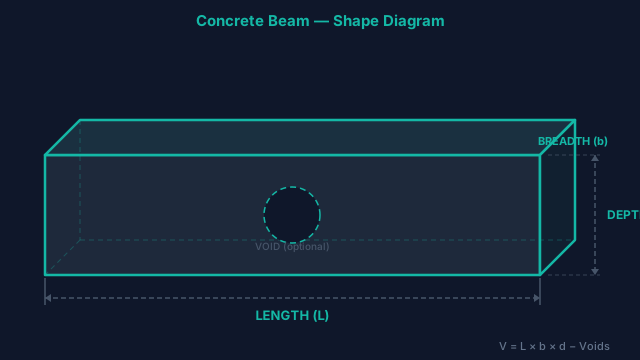
Worked Example: A Four-Beam Residential Floor Frame
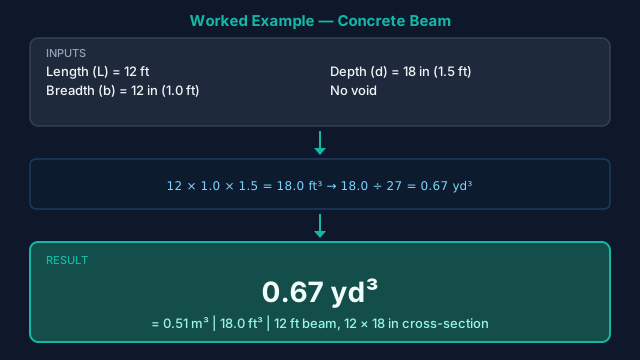
Say a residential floor frame repeats four identical RCC beams, each spanning 12 ft with a 12 in × 18 in section (b = 1 ft, d = 1.5 ft). Working in feet, the gross volume of one beam is L × b × d = 12 × 1 × 1.5 = 18 ft³, which is 18 ÷ 27 = 0.67 yd³ — the figure shown in Fig. 2. With no duct void in these beams, the net wet volume per beam stays at 18 ft³.
Multiply by the four identical beams: 18 × 4 = 72 ft³ of wet concrete (2.67 yd³, or about 2.04 m³). Now apply the default 5% waste allowance for form leakage and joint over-pour: 72 × 1.05 = 75.6 ft³ = 2.80 yd³. Because this is a ready-mix order, leave the dry-volume factor off and round up using the +10% buffer row — about 3.1 yd³ — so a 3-yard load plus a partial covers the pour with margin.
Had a 6 in × 6 in services duct run the full 12 ft of each beam, you would toggle the void on (0.5 × 0.5 × 12 = 3 ft³ per beam), dropping each beam to 15 ft³ net and the four-beam waste-adjusted total to about 2.45 yd³ — a meaningful difference worth deducting.
Entering Your Beam Dimensions
- 1In Step 1, choose your unit (meters, centimeters, millimeters, yards, feet, or inches). Every dimension you enter — beam and void — is interpreted in this single unit, so pick the one your drawing uses.
- 2In Step 2, enter the beam Length (L) — the clear span or total run of the member. For a floor beam this is the centre-to-centre column spacing or the figure on the framing plan.
- 3Enter the Width / Breadth (b) — the horizontal thickness of the beam section, typically 9–12 in (≈ 0.23–0.30 m) for residential beams.
- 4Enter the Depth / Height (d) — the vertical dimension of the section measured from soffit to top. For a beam cast monolithically with a slab, enter only the drop below the slab soffit, not the full depth including the slab.
- 5In Step 3, enter the Number of Beams — how many identical members share these exact dimensions. Beams of a different size should be calculated in a separate run and added.
- 6Set the Waste Allowance (%). The default 5% suits straight, formed beams; increase to 8–10% for congested reinforcement, pumped placement, or hand-buggy work.
- 7In Step 4, toggle Subtract a void if a duct, sleeve, or block-out runs through the beam, then enter its Width, Depth, and Length in the same unit. The void volume is removed from every beam.
- 8In Step 5, leave Use Dry Volume Factor on (≈ 1.50–1.54) if you are estimating dry materials or bags; switch it off to size wet ready-mix volume only.
- 9Press Calculate. The panel reveals per-beam volume (wet, wet + waste, and dry), the project totals for your beam count, ft³/yd³ conversions, and cubic-yard rows with +5% and +10% buffers.
- 10Click Print / Save to export an A4 summary of inputs and results, then choose Save as PDF in your browser's print dialog for the project record or batch-plant order.
The Beam Volume Formula
- 1) Gross Beam Volume (per beam)Gross Volume = L × b × d
The prismatic volume of one beam. All three dimensions are converted to a common unit first. This assumes a constant rectangular section along the full length — haunched or tapered beams should be split into prismatic segments and summed. - 2) Void (Duct) DeductionVoid Volume = Lvoid × bvoid × dvoid | Net Wet Volume = Gross − Void
Subtracts one uniform rectangular block-out per beam. For a circular duct, approximate the equivalent rectangular footprint, or treat the diameter as both void width and depth for a conservative deduction. - 3) Waste AllowanceWet + Waste = Net Wet Volume × (1 + Waste% ÷ 100)
Applied per beam before totalling. 5% is standard for formed beams; congested beam-column joints, pumped concrete, and hand placement justify 8–10%. - 4) Dry-Volume Factor (optional)Dry Volume = (Wet + Waste) × Dry Factor (Dry Factor ≈ 1.50–1.54)
Converts placed wet volume into the larger dry material volume needed when batching from cement, sand, and aggregate. Leave it off when ordering ready-mix by the wet cubic yard. - 5) Multi-Beam TotalsTotal = Per-Beam Volume × Number of Beams
Only multiplies beams that share the same dimensions. Mixed-size frames are calculated per size and added. - 6) Unit Conversions (display)1 m³ = 35.3147 ft³ | 1 m³ = 1.30795 yd³ | 1 yd³ = 27 ft³
Cubic yards are the US ready-mix ordering unit; the +5% and +10% rows give you a buffer for spillage and section over-tolerance.
Common Beam Sizes at a Glance
Typical sections for common reinforced-concrete beam types, with concrete volume per linear foot and per 10 ft run. Use these as a sanity check against your calculator result. Reinforcement counts are indicative only — bar size, count, and stirrup spacing must come from a structural design.
| Beam Type | Typical b × d | Volume per LF (ft³) | Per 10 ft (yd³) | Typical Main Bars |
|---|---|---|---|---|
| Lintel (over opening) | 9" × 6" | 0.375 | 0.139 | 2 × #4 bottom |
| Plinth / tie beam | 9" × 12" | 0.75 | 0.278 | 2 #4 top + 2 #4 bottom |
| Residential floor beam | 12" × 18" | 1.50 | 0.556 | 4–6 × #5 + stirrups |
| Garage / transfer beam | 12" × 24" | 2.00 | 0.741 | 6 × #6 + stirrups |
| Grade beam (foundation) | 16" × 24" | 2.67 | 0.988 | 6 × #6 top & bottom |
| T-beam web (below slab) | 10" × 16" web | 1.11 | 0.412 | 4 × #5 + flange steel |
Volume per LF = (width ÷ 12) × (depth ÷ 12). For a T-beam or L-beam cast monolithically with a slab, enter only the web depth below the slab soffit so the slab concrete is not counted twice — the flange belongs to the slab calculation.
Why Beam Pours Come Up Under
- Counting the slab on top of a monolithic beam twice. When a beam and slab are poured together, the beam depth (d) you enter should stop at the slab soffit. Including the slab thickness in d and again in your monolithic slab calculation double-orders the overlap.
- Mixing depth (d) with the column it frames into. A beam stops at the column face; do not extend the beam length through the column. The column volume belongs to the column calculator.
- Multiplying non-identical beams. The beam-count field assumes every beam shares the same L, b, and d. Run mixed sizes separately and add the totals — otherwise the smallest or largest beam quietly skews the whole order.
- Leaving the dry-volume factor on for ready-mix. The 1.5× dry factor is for batching dry materials. Order ready-mix by the wet (waste-adjusted) cubic yard, or you will buy roughly 50% too much.
Pairing the Beam Calculator with Other Tools
Use this beam calculator for horizontal members where volume is driven by a small rectangular section run over a length — floor beams, plinth and tie beams, lintels, and grade beams. For vertical members, the column concrete calculator uses the same L × b × d logic but is set up for height and column counts. If you are pouring the suspended floor that the beams support, estimate that flatwork with the slab concrete calculator, and where beams and slab are cast in one operation, the monolithic slab calculator handles the thickened-edge case. For the foundations the beams frame into, see the footing calculator; for cast-in-place walls that act as deep beams, the wall concrete calculator handles openings and deductions directly.
Specs & References
Governs beam design including minimum width and depth, flexural and shear reinforcement, stirrup spacing, and the concrete cover requirements that set the gross section dimensions you enter here. Most building beams specify f'c of 3,000–4,000 PSI at 28 days per §26.4.
Provides the mix-proportioning method behind the dry-volume factor: it explains why a placed (wet) cubic foot of beam concrete requires roughly 1.50–1.54 times the loose dry material volume when batching cement, sand, and aggregate.
Specifies delivery, slump, and tolerance requirements for ready-mix. Workability matters most for beams: congested stirrups and bottom-bar layers need adequate slump so concrete fully encases the steel, which is also why a waste allowance for placement loss is prudent.
Beam sizing must satisfy both flexural demand and the shear envelope — stirrup spacing, tension-steel cutoffs, and bottom-bar cover must be reviewed by a licensed structural engineer before any concrete is placed; this tool estimates concrete quantity only and does not size reinforcement.
Ordering & Volume Questions
What does the beam concrete calculator do?
It estimates the volume of concrete needed to pour one or more reinforced-concrete beams from the three section dimensions on a drawing — length (L), breadth (b), and depth (d). It subtracts any duct void, multiplies by the number of identical beams, adds a waste allowance, and optionally applies a dry-volume factor, then reports the result in m³, yd³, and ft³ with +5% and +10% ordering buffers.
How do I calculate the concrete volume of a beam by hand?
Multiply length × breadth × depth in a common unit. For a 12 ft beam that is 12 in (1 ft) wide and 18 in (1.5 ft) deep: 12 × 1 × 1.5 = 18 ft³, which is 18 ÷ 27 = 0.67 yd³. Subtract any void volume, then add 5% for waste before ordering.
Which dimensions do I enter — and what is the depth?
Enter the clear span or run as Length (L), the horizontal section thickness as Width/Breadth (b), and the vertical section height as Depth/Height (d). Depth is measured from the beam soffit to the top of the beam — for a beam cast with a slab, stop at the underside of the slab.
How do I avoid double-counting concrete where a beam meets the slab?
When a beam and slab are poured monolithically, enter only the beam drop below the slab soffit as the depth (d). The slab thickness above the beam belongs to the slab calculation. Adding the slab thickness into the beam depth and again into the slab estimate over-orders the overlap zone.
What is the void / duct option for?
It deducts a uniform rectangular block-out that runs through the beam — a services duct, conduit bank, sleeve, or recess. Enter the void width, depth, and length in the same unit as the beam, and the calculator removes that volume from every beam before applying waste.
How much concrete does a typical residential floor beam need per linear foot?
A common 12 in × 18 in residential floor beam needs (1 ft × 1.5 ft) = 1.5 ft³ per linear foot, or about 0.056 yd³/LF. A 9 in × 12 in plinth/tie beam needs 0.75 ft³/LF, and a 9 in × 6 in lintel about 0.375 ft³/LF.
What waste percentage should I use for beams?
A 5% allowance is standard for straight, formed beams. Increase it to 8–10% for heavily reinforced sections, beam-column joints with congested steel, pumped placement, or hand-buggy work where spillage and over-pour are more likely.
What is the dry-volume factor and when should I use it?
The dry-volume factor (about 1.50–1.54) converts the placed wet concrete volume into the larger volume of dry materials needed when batching from cement, sand, and aggregate. Keep it on when estimating dry materials or bags; turn it off when ordering wet ready-mix by the cubic yard.
Does this calculator size the rebar or design the beam?
No. It estimates concrete quantity only. Beam depth, width, reinforcement, stirrup spacing, and cover must come from a structural design per ACI 318-19. The reinforcement counts in the reference table are indicative for sanity-checking, not for construction.
What is the difference between estimating a beam and a column?
The math is identical — volume = L × b × d — but a beam is horizontal and its length is the span, while a column is vertical and its length is the height. Use this beam tool for spans and the column concrete calculator for vertical members, mainly so the labels and defaults match what you are pouring.
What is the difference between a lintel and a beam?
A lintel is a short, lightly loaded beam spanning a door or window opening (often 9 in × 6 in), carrying only the masonry and load directly above the opening. A structural beam spans between supports and carries floor or roof loads, so it is deeper and more heavily reinforced. Both are estimated with the same L × b × d formula here.
Can I calculate a T-beam or L-beam with this tool?
Yes — enter only the web (the rectangular stem below the slab) as the beam section, because the flange is part of the slab poured above it. Estimate the flange with the slab calculator. This keeps the shared concrete from being counted in both the beam and slab orders.
Should I use bags or ready-mix for a beam pour?
Below roughly 0.3–0.5 yd³ total, pre-mix bags can be practical for a small lintel or single short beam. Above that, ready-mix is more economical and gives more consistent strength — important for structural beams. The yd³ result and +10% buffer help you decide and place the order.
How do I estimate concrete for beams of different sizes?
Run the calculator once for each distinct beam size, with that size's count, and add the totals. The number-of-beams field multiplies only identical members, so mixing sizes in a single run would apply one section to all of them and distort the order.
Can I print or save my beam estimate?
Yes. After pressing Calculate, click Print / Save to open a clean A4 summary listing the units, beam dimensions, void, waste, dry factor, per-beam and total volumes, and the cubic-yard ordering rows. Choose Save as PDF in your browser's print dialog to keep a copy for submittals or the batch-plant order.
Related Calculators
Column Concrete Calculator
Volume for square, rectangular, and circular columns.
Footing Concrete Calculator
Continuous, isolated, and combined footings.
Wall Concrete Calculator
Vertical concrete wall volumes, single or multi-segment.
Rebar Calculator
Estimate rebar bars, linear footage, weight, and cost for slabs, footings, and walls.
Concrete Yards Calculator
Convert and compute volume into cubic yards.