How Many Rebar Bars a Slab-on-Grade Grid Actually Takes
The Rebar Calculator is a bar-count takeoff tool: give it a slab, footing, or wall layout and it works out exactly how many individual bars fit the grid, how many linear feet of steel that grid consumes, what it weighs, and — in Advanced mode — how many stock-length bars to order and what the material and labor will cost. It is built for the moment you are standing at a layout with a tape measure, not for converting an already-known footage into shipping weight. For bar sizes, spacing rules, and concrete cover in one place, see our pillar guide on rebar sizing & spacing.
Length and width spacing are entered independently — important for one-way slabs where the two directions genuinely differ — and the calculator applies a concrete cover setback on all four edges before it counts bars, so the grid it reports matches what actually gets tied inside the formwork rather than a naive edge-to-edge count. A live check flags spacing tighter than ACI 318's minimum clear distance for the selected bar size. To see where the steel goes inside the pour, read our guide on how to reinforce a concrete slab; for the volume it sits in, how to calculate concrete for a slab; and for footing steel specifically, our concrete footing calculations guide.
Rebar Size & Weight Reference (ASTM A615)
Standard deformed carbon-steel bar sizes, diameters, and unit weights per ASTM A615/A615M. The calculator's bar-size selector covers #3 through #8, the range used in the overwhelming majority of residential and light-commercial slabs, footings, and walls. #9–#11 are listed for reference on heavier structural members — enter their footage into the calculator manually using Advanced mode's price fields if your project calls for them.
| Bar # | Diameter (in) | Diameter (mm) | Weight (lb/ft) | In calculator? |
|---|---|---|---|---|
| #3 | 0.375″ | 9.5 | 0.376 | Yes |
| #4 | 0.500″ | 12.7 | 0.668 | Yes |
| #5 | 0.625″ | 15.9 | 1.043 | Yes |
| #6 | 0.750″ | 19.1 | 1.502 | Yes |
| #7 | 0.875″ | 22.2 | 2.044 | Yes |
| #8 | 1.000″ | 25.4 | 2.670 | Yes |
| #9 | 1.128″ | 28.7 | 3.400 | Reference only |
| #10 | 1.270″ | 32.3 | 4.303 | Reference only |
| #11 | 1.410″ | 35.8 | 5.313 | Reference only |
Standard mill stock lengths are 20, 40, and 60 feet, with 20-ft the most common truck-deliverable length for residential suppliers — this is the calculator's default stock length in Advanced mode, and you can change it to match whatever your local yard actually stocks.
Entering Your Rebar Grid Dimensions
- 1Pick a project-type preset — Slab, Strip Footing, or Wall — to load sensible starting defaults for dimensions, cover, spacing, and bar size. Every value loaded by a preset can be overridden.
- 2Enter Length and Width (each with its own unit — feet, inches, or meters). For a strip footing, Length is the total run and Width is the trench width, which is typically entered in inches.
- 3Enter Concrete Cover — the setback from the slab or footing edge to the first bar. The calculator subtracts cover from both edges of both dimensions before it starts counting bars, so a 20-ft slab with 2" cover counts bars across a 19.67-ft net span, not the full 20 ft.
- 4Set the Waste / Overlap Factor (10% is the default). This is added to raw linear footage to cover lap splices, cuts, and off-cuts.
- 5Select Bar Size from the #3–#8 dropdown. The panel beside the selector shows that bar's diameter, cross-sectional area, weight per foot, and ACI minimum clear spacing so you can sanity-check the choice before calculating.
- 6Enter Spacing — length direction and Spacing — width direction independently. These control on-center bar spacing along each axis; set one to 0 to skip that direction entirely (useful for one-way footing steel).
- 7Choose Rebar Layers: single layer for most slabs, or double layer (mat) for structural slabs 6" and thicker, elevated slabs, or two-way designs that need top and bottom steel.
- 8In Advanced mode, enter Stock Bar Length (20 ft by default) to convert total footage into a bar-order count, plus optional Material Price per Linear Foot, Labor per Linear Foot, and a lump-sum Delivery cost.
- 9Press Calculate. The results pane shows total bars, total linear footage, total weight, coverage area, a length/width directional breakdown, and — in Advanced mode — the stock-bar order count and cost total.
How the Rebar Bar Count Is Calculated
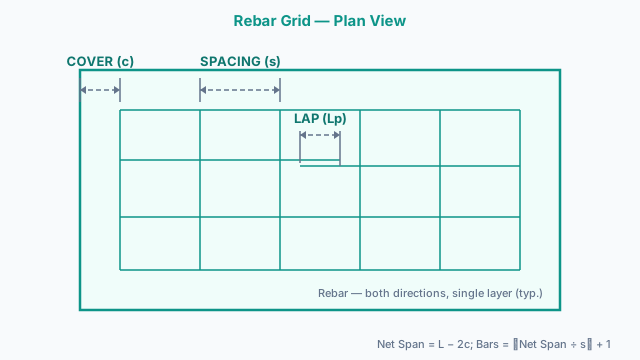
- 1) Net Span (after cover)Net Length = Length − (2 × Cover)
Net Width = Width − (2 × Cover)
Cover is subtracted from both edges of both dimensions before any bar is counted, so a wider cover setback shrinks the grid the calculator lays out. - 2) Bar Count per DirectionBars along length = floor(Net Length ÷ Spacinglength) + 1
Bars along width = floor(Net Width ÷ Spacingwidth) + 1
Each bar counted “along length” is spaced at intervals across the length axis but physically spans the full width dimension (and vice versa) — the +1 accounts for the bar sitting at the starting edge. - 3) Linear Footage per DirectionLF (length-direction bars) = Bars along length × Width × Layers
LF (width-direction bars) = Bars along width × Length × Layers
Raw Total LF = LF (length-direction) + LF (width-direction)
Double-layer mats simply double the footage for both directions since the layer count multiplies straight through. - 4) Waste-Adjusted Total & WeightTotal LF = Raw Total LF × (1 + Waste% ÷ 100)
Total Weight (lbs) = Total LF × Weight per Linear Foot
Total Weight (tons) = Total Weight (lbs) ÷ 2,000
Weight-per-foot values come from the ASTM A615 table above. - 5) Stock Bars to Order (Advanced)Stock Bars = ⌈Total LF ÷ Stock Bar Length⌉
Always rounds up — a fractional bar still means buying a whole one. - 6) ACI 318 Minimum Clear Spacing CheckMinimum Clear Spacing = Bar Diameter + 1″
ACI 318-19 §25.8.1 requires clear distance between parallel bars of at least 1″, the bar diameter, or 4/3 the nominal maximum aggregate size — whichever is greatest. The calculator flags entered spacing tighter than bar diameter + 1″ as a practical warning. - 7) Cost Estimate (Advanced)Material Cost = Total LF × Price per Linear Foot
Labor Cost = Total LF × Labor Rate per Linear Foot
Grand Total = Material Cost + Labor Cost + Delivery
One pitfall the flat waste percentage can hide: lap splice length scales with bar diameter, not with slab area. A #4 bar's typical Class B lap runs about 26 inches; step up to a #6 bar for a wall or footing and that lap grows to roughly 40 inches — more than 50% longer per splice. A single 10% waste factor tuned for #4 slab work will quietly under-order footage on a project that steps up to heavier bar, since the extra length per lap doesn't scale linearly with the waste percentage.
Worked Takeoff: 20×20 ft Slab, #4 Rebar at 12″ O.C.
You are laying out reinforcement for a 20 × 20 ft garage slab, #4 rebar spaced 12″ on-center in both directions, 2″ concrete cover, single layer, and a 10% waste factor — the exact defaults the calculator's Slab preset loads.
- Net length and net width = 20 ft − (2 × 2″⁄12) = 20 − 0.333 = 19.667 ft each direction
- Bars per direction = floor(19.667 ÷ 1 ft) + 1 = 20 bars along length and 20 bars along width (12″ spacing = 1 ft)
- Raw linear footage = (20 bars × 20 ft) + (20 bars × 20 ft) = 400 + 400 = 800 LF
- With 10% waste = 800 × 1.10 = 880 LF
- Total bars = 20 + 20 = 40 bars
- Total weight = 880 LF × 0.668 lb/ft = 588 lbs (0.294 tons)
- Stock bars to order (20-ft stock) = ⌈880 ÷ 20⌉ = 44 bars
Because length and width are equal here, both directions come out identical — on a rectangular slab (say 24 × 16 ft) the two directions diverge, which is exactly why the calculator tracks them separately rather than assuming a square grid. The Directional Breakdown panel in the results shows both directions side by side, and the Print / Save button exports the full takeoff for a supplier order.
Quantity Mistakes That Leave a Rebar Order Short
- 1Forgetting lap splice length inflates footage beyond a flat waste percentage
A flat 10% waste factor works reasonably well for #3–#4 bar on slab work, but Class B lap splice length scales with bar diameter, not with the waste percentage. A #6 bar's typical lap runs roughly 40 inches versus about 26 inches for a #4 bar. On a footing or wall using heavier bar, bump the waste factor to 15–20% rather than trusting the slab-tuned default.
- 2Not rounding the stock-length bar count up
Total linear footage rarely divides evenly by a 20-ft stock bar. The calculator's Stock Bars figure always rounds up (⌈Total LF ÷ Stock Length⌉) — if you compute the ratio by hand and round down or truncate instead, you will arrive on site one bar short of completing the last run.
- 3Ignoring cover requirements shifts the effective grid dimensions
Concrete cover is subtracted from both edges of both length and width before bars are counted, which shrinks the net span the grid actually spans. Skipping this step and counting bars across the full outer dimension over-states bar count on a small grid and, more importantly, mismatches what a licensed inspector will measure against ACI 318 §20.6.1.3 cover requirements.
- 4Treating length-direction and width-direction spacing as interchangeable
One-way slabs and most footings intentionally use tighter spacing in one direction than the other. Entering the same spacing value for both directions on a rectangular layout produces a bar count that doesn't match the design drawings — always read length-direction and width-direction spacing off the plan separately rather than assuming symmetry.
- 5Missing the double-layer multiplier on structural slabs
Selecting Double layer (mat) doubles both the bar count and the linear footage for top and bottom steel — it does not automatically apply itself. If a structural slab 6 inches or thicker calls for two mats and Single layer is left selected, the takeoff will be short by exactly half the required steel.
Bar-Count Takeoff vs. Weight and Spacing Tools
Use this Rebar Calculator when your starting point is a layout — a slab, footing, or wall with known dimensions — and you need bar count, linear footage, and weight for a fresh takeoff. It is a takeoff tool: dimensions and spacing in, bar count and footage out.
Switch to the Rebar Weight Calculator when you already have a linear footage or bar count figure — from a supplier quote, a structural drawing schedule, or this calculator's own output — and need to convert it to shipping weight in pounds, tons, or kilograms per ASTM A615 bar tables for procurement or freight purposes.
Use the Rebar Spacing Calculator when the question runs the other direction — you have a bar count or spec sheet and need to verify or solve for spacing, or specifically check compliance against ACI 318 §25.8.1 minimum clear-distance rules. If the structural drawings allow welded wire fabric as an alternative to discrete bars, the Wire Mesh Calculator estimates rolls, sheets, and weight for 6×6 W1.4 through W4.0 fabric instead. Once rebar is quantified, total the concrete volume around it with the Slab Concrete Calculator or the Footing Concrete Calculator to complete the full material takeoff.
Product Standards & Specs
The primary U.S. rebar specification, defining the diameter, cross-sectional area, and unit weight (lb/ft) for #3 through #18 deformed bar sizes — the same figures used in this calculator's bar reference table and weight calculations.
Provides the minimum clear spacing requirements (§25.8.1) and concrete cover requirements (§20.6.1.3) this calculator's net-span and spacing-warning logic is built around. It also governs lap splice length, which is not automatically added to the takeoff and should be accounted for separately in the waste factor.
This calculator produces a quantity estimate, not a structural design. Bar size, grade, spacing, and splice detailing for any load-bearing element must be specified or verified by a licensed structural engineer.
Quantity & Ordering Questions
How many rebar bars do I need for a 20×20 ft concrete slab?
For a 20×20 ft slab with #4 rebar at 12" spacing in both directions, 2" cover, single layer, and 10% waste, the takeoff works out to 40 bars and 880 linear feet — about 588 lbs (0.294 tons) of steel and 44 stock bars if you're buying 20-ft lengths. Enter your exact dimensions into the calculator above for a precise figure.
What size rebar should I use for a residential concrete driveway?
#4 rebar (1/2" diameter) at 12" center-to-center in both directions is the most common specification for a 4–5" residential driveway slab. Some contractors use welded wire mesh for light driveways instead, but #4 rebar provides superior crack resistance under vehicle loads.
Why does the calculator subtract cover before counting bars?
Concrete cover is the required setback from the slab or footing edge to the outside face of the rebar. The calculator subtracts cover from both edges of both dimensions to get a net span, then counts bars across that net span — matching how bars are actually tied inside formwork rather than an idealized edge-to-edge grid.
Why do I set spacing separately for length and width?
Many slabs and most strip footings are one-way designs where the two directions carry different loads and use different bar spacing on the drawings. Setting each direction independently lets the takeoff match an asymmetric grid exactly instead of forcing a square pattern.
What is the difference between single-layer and double-layer rebar?
A single-layer mat is one grid of rebar placed at or near mid-depth — the most common setup for residential slabs. A double-layer mat places two grids (top and bottom), required for slabs 6" or thicker, elevated structural slabs, two-way slabs, and slabs subject to heavy point loads. Selecting Double layer in the calculator doubles both bar count and linear footage.
Why does the calculator add a waste percentage on top of the raw footage?
Rebar is cut to fit and the off-cuts are discarded, and bars must overlap at splices (typically 40–60 bar diameters for a standard Class B lap). A 10% waste factor covers typical lap splices and cuts on slab-scale bar sizes; step up to 15–20% for footings or walls using #5 bar and larger, since lap length grows with bar diameter, not with the waste percentage.
How do I get the total weight of rebar for my project?
The calculator multiplies total linear footage (already including waste) by the weight-per-foot value for your selected bar size — 0.668 lb/ft for #4, for example — and reports both pounds and US tons automatically. If you already know your footage and just need the weight conversion, the Rebar Weight Calculator handles that single step directly.
How many 20-foot rebar bars do I need to order?
Switch on Advanced mode and set Stock Bar Length to 20 ft (the default). The calculator divides total required linear footage — including waste — by 20 and rounds up, so a 880-LF takeoff returns 44 bars to order, never a fractional bar.
What is the ACI minimum rebar spacing requirement?
ACI 318-19 §25.8.1 requires the clear distance between parallel bars to be at least 1 inch, the nominal bar diameter, or 4/3 times the nominal maximum coarse aggregate size — whichever is greatest. The calculator flags a warning whenever entered spacing is tighter than bar diameter + 1" as a practical check against this rule.
What concrete cover should I use for rebar?
ACI 318 §20.6.1.3 requires at minimum 3/4" cover for concrete cast in forms and not exposed to weather, 1.5" for concrete exposed to weather or earth, and 3" for concrete cast directly against and permanently in contact with the ground. Most residential slab designs use 2"–3" of cover at the edges as a practical default.
Is a rebar bar-count takeoff accurate enough for structural design?
This calculator is accurate for material quantity estimation and preliminary budgeting — it is not a structural design tool. For any load-bearing element (beams, columns, foundations, retaining walls), the final reinforcement layout, bar size, spacing, and splice lengths must be designed and sealed by a licensed structural engineer.
Is the Rebar Calculator free to use?
Yes, completely free — no account, subscription, or usage limit. After clicking Calculate, use the Print / Save button to export a formatted takeoff you can bring directly to a supplier or keep in your project file.
Related Calculators
Rebar Weight Calculator
Convert rebar linear footage to weight in lbs, tons, and kg, or reverse from a tonnage spec to footage — for procurement, logistics, and cost planning.
Rebar Spacing Calculator
Calculate rebar bar count from a target c-t-c spacing or find spacing from a bar count, with ACI 318-19 compliance checks for slabs, footings, walls, and beams.
Wire Mesh Calculator
Estimate welded wire fabric rolls, sheets, weight, and cost for concrete slabs, driveways, sidewalks, and industrial floors.
Slab Concrete Calculator
Estimate concrete for slabs, patios, and floors.
Footing Concrete Calculator
Continuous, isolated, and combined footings.