What Governs Safe Rebar Spacing
The Rebar Spacing Calculator determines bar count, centre-to-centre spacing, and clear spacing for reinforced concrete slabs, footings, walls, and beams — and checks all results against ACI 318-19 code requirements automatically. It works bidirectionally: enter a target spacing to find how many bars fit, or enter a bar count to find the resulting spacing, along with a live slab diagram that redraws proportionally every time inputs change. For the full picture of bar sizes, spacing limits, and concrete cover, see our pillar guide on rebar sizing & spacing.
Rebar spacing errors are one of the most common causes of field inspection failures on reinforced concrete projects. Bars placed too close violate ACI 318 §25.8.1 minimum clear spacing, preventing proper concrete consolidation around the steel. Bars placed too far apart violate ACI 318 §7.7.2.3 maximum spacing for slabs, leaving sections of concrete under-reinforced. This calculator flags both violations instantly so contractors, engineers, and inspectors can verify compliance before the pour. For where the steel sits in the slab, see our guide on how to reinforce a concrete slab; for the concrete around it, how to calculate concrete for a slab; and for footing bars, our concrete footing calculations.
Assumptions Behind the Rebar Spacing Check
- Cover is deducted equally from both ends of the span. The model subtracts concrete cover from each side before placing bars, matching standard reinforcing practice — it assumes symmetric cover, not a condition where one face has different exposure.
- Minimum clear spacing defaults to 3/4-inch maximum aggregate. Unless you enter a specific aggregate size in Advanced mode, the ACI 318 §25.8.1 check uses the 4/3 × aggregate criterion for 3/4-inch aggregate — the most common residential and commercial spec. Larger aggregate requires a wider minimum clear spacing than the default.
- Maximum spacing check applies to non-prestressed slabs. The ACI 318 §7.7.2.3 check (max c-t-c = min(3 × thickness, 18 in)) is written for conventional reinforced slabs. If slab thickness is not entered, the model falls back to the 18-inch absolute limit rather than the thickness-based one.
- Bar count assumes straight, uniformly spaced bars across a single span. The forward and reverse formulas both assume one continuous span with equal spacing throughout — not a layout with varying spacing zones (e.g., tighter spacing near a column strip in a two-way slab).
- Total steel area (As) reports provided, not required, reinforcement. As = bar count × bar area tells you what your spacing choice delivers. It is not a structural design calculation of what As is required for the applied loads.
The Governing Rebar Spacing Equations
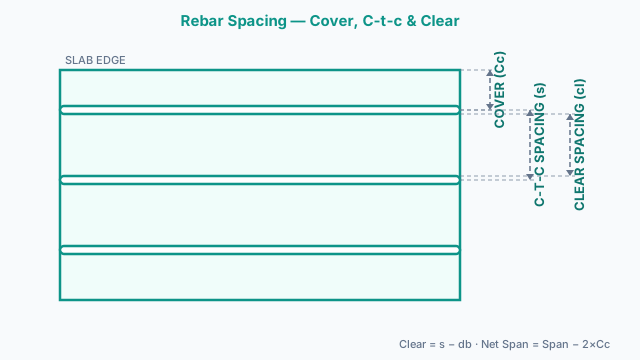
- 1) Net span (after cover deduction)Net Span = Total Span − (2 × Concrete Cover)
Cover is subtracted from both ends. This is the length available for bar placement. - 2) Bar count from spacing (forward direction)Bar Count = ⌊Net Span ÷ C-t-c Spacing⌋ + 1
Floor division gives the number of equal spacings; adding 1 gives the bar count including both end bars. - 3) C-t-c spacing from bar count (reverse direction)C-t-c Spacing = Net Span ÷ (Bar Count − 1)
Bar count minus 1 gives the number of spaces between bars. - 4) Clear spacingClear Spacing = C-t-c Spacing − Bar Diameter
The gap between the faces of adjacent bars. This is what inspectors measure in the field. - 5) ACI 318-19 §25.8.1 — Minimum clear spacingMin Clear = max(1.0", bar diameter, 4/3 × max aggregate size)
The largest of these three values governs. Default: max(1.0", bar dia) for 3/4" aggregate. Violation = clear spacing < min clear. - 6) ACI 318-19 §7.7.2.3 — Maximum c-t-c spacing (slabs)Max C-t-c = min(3 × slab thickness, 18")
Applies to non-prestressed one-way and two-way slabs. If slab thickness is not entered, the 18" absolute limit is used. Violation = c-t-c spacing > max c-t-c. - 7) Total steel areaAs = Bar Count × Bar Area (in²)
Per ASTM A615/A706: #3 = 0.11 in², #4 = 0.20 in², #5 = 0.31 in², #6 = 0.44 in², #7 = 0.60 in², #8 = 0.79 in². Used to verify As provided vs. As required from structural design.
Running the Rebar Spacing Calculator
- 1Select a project type preset — Slab/Patio, Strip Footing, Concrete Wall, or Beam — to load typical values, or enter your own.
- 2Enter the span length: the total concrete dimension being reinforced. Select feet, inches, or metres.
- 3Enter the concrete cover: the distance from the edge of the concrete to the centre of the first bar. Typically 2 inches for slabs, 3 inches for footings and ground-exposed members.
- 4Select the bar size (#3 through #8). The info panel shows diameter, area, and common application.
- 5Choose a calculation direction: 'Enter spacing → get bar count' if you know your target spacing; 'Enter bar count → get spacing' if you know how many bars you want.
- 6Enter either the target c-t-c spacing or the number of bars, depending on direction selected.
- 7Switch to Advanced mode to enter slab thickness (for the ACI §7.7.2.3 max spacing check) and maximum aggregate size (for a more precise §25.8.1 min clear check).
- 8Press Calculate. Review bar count, c-t-c spacing, clear spacing, and total steel area.
- 9Check the ACI 318 compliance panel — each check shows PASS or FAIL with the specific code section and required value.
- 10Review the live slab diagram showing bars at their correct proportional positions across the span.
- 11Use Print / Save to export a PDF for inspections, permit documentation, or site records.
ACI 318 Rebar Spacing Design Values
Use this table as a starting point when selecting spacing. The ACI minimum clear spacing governs how close bars can be; the ACI maximum c-t-c governs how far apart they can be in slabs. Your actual design spacing must fall between these limits.
| Bar size | Diameter | Area (in²) | Min clear (ACI §25.8.1) | Max c-t-c slabs |
|---|---|---|---|---|
| #3 | 3/8" | 0.11 | ≥ 1.0" | ≤ 18" |
| #4 | 1/2" | 0.20 | ≥ 1.0" | ≤ 18" |
| #5 | 5/8" | 0.31 | ≥ 0.625" | ≤ 18" |
| #6 | 3/4" | 0.44 | ≥ 0.75" | ≤ 18" |
| #7 | 7/8" | 0.60 | ≥ 0.875" | ≤ 18" |
| #8 | 1" | 0.79 | ≥ 1.0" | ≤ 18" |
Min clear per ACI 318-19 §25.8.1 assuming 3/4" max aggregate. #5, #6, #7 min clear is governed by bar diameter (less than 1"). Max c-t-c §7.7.2.3 assumes slab thickness ≥ 6". Always verify with your structural drawings.
Typical Rebar Spacing by Project Type
Residential driveway (4" slab)
#4 @ 12" o.c. each way
Passenger vehicles
Patio / backyard slab (4" slab)
#4 @ 12–18" o.c. each way
Foot traffic only
Garage floor (4–6" slab)
#4 @ 12–16" o.c. each way
Light vehicle traffic
Sidewalk (4" slab)
#3 or #4 @ 18" o.c. (or WWF)
Pedestrian load
Residential footing
#4 or #5 @ 2–3 bars long., ties at 18"
Continuous footing
Structural slab (6"+ slab)
#5 @ 12" o.c. both ways, double mat
Engineer to specify
Retaining wall (stem)
#5 or #6 @ 12" vertical, 18" horizontal
Lateral earth pressure
Beam stirrups
#3 or #4 @ d/2 max (ACI §9.7.6)
d = effective depth
Starting-point values only. Final layout must be designed by a licensed structural engineer and comply with local code, project drawings, and applicable ACI standards.
Worked Analysis: 20-Foot Driveway Slab Spacing Check
A 20-foot residential driveway is reinforced with #4 bar and 2-inch cover, 4 inches thick. Net span: 240 in − (2 × 2 in) = 236 in. Targeting 12-inch c-t-c spacing: Bar count = ⌊236 ÷ 12⌋ + 1 = 19 + 1 = 20 bars. Clear spacing = 12 in − 0.5 in (#4 diameter) = 11.5 in. Min clear check (§25.8.1): max(1.0 in, 0.5 in) = 1.0 in required; 11.5 in provided → PASS. Max c-t-c check (§7.7.2.3): min(3 × 4 in, 18 in) = 12 in max; 12 in provided → PASS (right at the limit — tightening to 11 in o.c. would add margin). Total steel area: As = 20 × 0.20 in² = 4.0 in² across the 20-foot width. The result confirms the common 12-inch #4 driveway spacing is exactly at the ACI maximum for a 4-inch slab — a useful check before assuming a “standard” spacing is automatically compliant.
Limits of This Rebar Spacing Check
- ⚠️Dimensional compliance only — not a strength design
This calculator checks spacing against ACI 318 dimensional limits but does not perform structural design calculations. It cannot determine whether the chosen bar size and spacing provide adequate strength for your specific loads, soil conditions, or structural system.
- ⚠️Excludes lap splice and development length
Rebar spacing estimates here do not include lap splice lengths, development lengths, or hook extensions — all governed separately by ACI 318-19 §25.4–25.5. A layout that passes the spacing check can still fail if splice locations or lengths are wrong.
- ⚠️Consult a licensed structural engineer for load-bearing designs
All reinforcement for load-bearing applications must be designed and sealed by a licensed structural engineer. Use this tool to verify code-minimum spacing compliance, not as a substitute for engineered design.
For the procurement step — counting bars and estimating linear footage — the rebar calculator is the right next tool. When the ordering document requires weight in lbs or tons, the rebar weight calculator converts linear footage using ASTM A615/A706 published unit weights. If the structural drawings permit welded wire mesh as an alternative to discrete bars, estimate your coverage with the wire mesh calculator. Finally, size the concrete pour itself with the slab concrete calculator or the footing concrete calculator to complete the full material takeoff.
Governing Codes & Standards
Provides the minimum clear spacing requirement (§25.8.1: max(1", bar dia, 4/3 × aggregate size)) and maximum c-t-c spacing for slabs (§7.7.2.3: min(3 × thickness, 18")) that power this calculator's ACI compliance checks.
Defines the exact bar diameters and cross-sectional areas (#3 through #8) used in this calculator's reference table, clear-spacing checks, and total steel area (As) output.
Rebar spacing estimates do not include lap splice lengths, development lengths, or hook extensions; confirm bar spacing, concrete cover, and splice locations with a licensed structural engineer per ACI 318-19 §25.5 and §20.6.
Engineering & Design Questions
What is a rebar spacing calculator?
A rebar spacing calculator determines bar count, centre-to-centre spacing, and clear spacing for reinforced concrete members. It uses span length, concrete cover, and bar size to calculate how many bars fit at a given spacing — or what spacing results from a given bar count — and checks results against ACI 318 code requirements.
How do I calculate rebar spacing?
Subtract the concrete cover from both ends of the span to get the net span. Divide the net span by the desired c-t-c spacing and add 1 to get bar count: bars = floor(net span ÷ spacing) + 1. To go the other way, divide the net span by (bar count − 1) to get c-t-c spacing. Clear spacing = c-t-c spacing − bar diameter.
What is c-t-c spacing in rebar?
C-t-c stands for centre-to-centre — the distance measured from the centreline of one bar to the centreline of the adjacent bar. This is the standard way rebar spacing is specified on structural drawings and placement plans. Clear spacing is the gap between bar faces and equals c-t-c minus bar diameter.
What is the minimum rebar spacing per ACI 318?
ACI 318-19 §25.8.1 requires the clear distance between parallel bars to be at least: 1 inch, the nominal bar diameter, or 4/3 times the nominal maximum coarse aggregate size — whichever is greatest. For most residential concrete with 3/4-inch aggregate, the minimum clear is 1 inch for #3 and #4 bar, and equals the bar diameter for #5 through #7.
What is the maximum rebar spacing for concrete slabs?
ACI 318-19 §7.7.2.3 limits c-t-c spacing for non-prestressed slabs to the smaller of 3 times the slab thickness or 18 inches. For a 4-inch slab the maximum is min(12 inches, 18 inches) = 12 inches. For a 6-inch slab it is min(18 inches, 18 inches) = 18 inches. Our calculator applies this check automatically when slab thickness is entered.
Why does minimum clear spacing matter?
Insufficient clear spacing prevents concrete from flowing and consolidating properly between bars, creating voids, honeycombing, and bond failure. ACI 318 sets the minimum clear to ensure fresh concrete can pass between bars without the aggregate getting trapped. This is why the minimum is tied to aggregate size — larger aggregate needs more room.
What is concrete cover for rebar?
Concrete cover is the distance from the outer face of the concrete to the nearest edge of the rebar. ACI 318-19 Table 20.6.1.3 requires different cover for different exposure conditions: 3/4 inch for concrete cast in forms not exposed to weather (#5 and smaller), 1.5 inches for weather exposure, and 3 inches for concrete cast against ground. Cover protects steel from corrosion and provides fire resistance.
What is the difference between clear spacing and c-t-c spacing?
C-t-c spacing (centre-to-centre) is measured from bar centreline to bar centreline. Clear spacing is measured from the face of one bar to the face of the adjacent bar. Clear spacing = c-t-c spacing − bar diameter. ACI code limits are stated in terms of clear spacing; structural drawings typically specify c-t-c spacing. Our calculator shows both.
How do I check rebar spacing for ACI 318 compliance?
Check three things: (1) clear spacing ≥ max(1 inch, bar diameter, 4/3 × max aggregate size) per §25.8.1; (2) for slabs, c-t-c spacing ≤ min(3 × slab thickness, 18 inches) per §7.7.2.3; (3) concrete cover meets Table 20.6.1.3 requirements for your exposure condition. Our calculator automates checks 1 and 2.
What rebar spacing should I use for a 20-foot concrete driveway?
For a 20-foot residential driveway with #4 bar and 2-inch cover, a 12-inch c-t-c spacing gives approximately 19 bars across a 4-inch slab and passes all ACI 318 checks. Enter your exact dimensions in the calculator to confirm bar count and compliance before ordering.
Can I use this calculator for both slabs and footings?
Yes. Use the Slab/Patio preset for flatwork and the Strip Footing preset for continuous footings. Change the cover to 3 inches for footings in contact with soil. The ACI compliance checks apply to both applications, though footing design often involves additional requirements from ACI 318 Chapter 13.
What is total steel area and why does it matter?
Total steel area (As) is the sum of cross-sectional areas of all bars: bar count × individual bar area. Structural engineers use As to verify that the reinforcement provided meets or exceeds the As required from flexural, shear, and temperature/shrinkage calculations. Our calculator shows As so you can compare it to your structural drawing requirements.
Is the rebar spacing calculator free?
Yes. The Rebar Spacing Calculator on Concrete Calculator Max is completely free to use with no registration, subscription, or hidden fees. Both calculation directions — spacing to bars and bars to spacing — and all ACI 318 compliance checks are available at no cost.
Can I print or save my rebar spacing results?
Yes. After calculating, press Print / Save to open a print-optimized report with all inputs, results, and ACI compliance status. In your browser's print dialog, choose Save as PDF to keep a digital copy for inspections, permit applications, or site records.
Does the rebar spacing calculator replace a structural engineer?
No. This calculator checks spacing against ACI 318 dimensional limits but does not perform structural design calculations. It cannot determine whether the chosen bar size and spacing provide adequate strength for your specific loads, soil conditions, or structural system. All reinforcement must be designed and sealed by a licensed structural engineer for load-bearing applications.
Related Calculators
Rebar Calculator
Estimate rebar bars, linear footage, weight, and cost for slabs, footings, and walls.
Rebar Weight Calculator
Convert rebar linear footage to weight in lbs, tons, and kg, or reverse from a tonnage spec to footage — for procurement, logistics, and cost planning.
Wire Mesh Calculator
Estimate welded wire fabric rolls, sheets, weight, and cost for concrete slabs, driveways, sidewalks, and industrial floors.
Slab Concrete Calculator
Estimate concrete for slabs, patios, and floors.
Concrete Slab Load Capacity Calculator
Estimate load capacity of concrete slabs.