How Many Tons of Gravel a General Landscaping or Fill Job Takes
This is the general-purpose Gravel Calculator — the one to reach for when your project is not a single dedicated use case. It covers the broad middle of gravel work: landscaping beds and borders, French drains and drainage swales, backfill around footings and utility trenches, walkway and stepping-stone bases, and any fill where the material could plausibly be general aggregate, crushed stone, or pea gravel depending on what the supplier has on the lot. Because the right answer to "how much gravel" depends entirely on which of those materials you are buying — and gravel density can swing 20% or more between them — this calculator leads with a material/density choice rather than assuming one fixed stone.
Enter your project shape (rectangle, circle, or triangle), its dimensions and depth in any common unit, and a gravel type or custom density, and the calculator returns the footprint area, the volume in cubic yards, cubic feet, and cubic meters, the weight in tons, pounds, and kilograms, and an optional material cost from a price per ton or per cubic yard. If your job is one of the more specialized spokes off this hub — a compacted driveway base, a purely decorative pea-gravel bed, a recycled-aggregate fill, or a straight ton-to-yard conversion — the related calculators linked further down this page are purpose-built for those and will give tighter guidance than the general defaults here.
Gravel Type & Density Reference
Loose, dry bulk density by common gravel and aggregate type, with typical applications. This calculator's built-in presets (General, Pea, Crushed) sit inside this range — use Custom Density for a material not covered by a preset, or whenever your supplier hands you an exact figure.
| Gravel / Aggregate Type | Loose Density (lb/ft³) | Density (kg/m³) | Typical Applications |
|---|---|---|---|
| Pea gravel (⅜ in, rounded) | 95–100 | 1,520–1,600 | Decorative beds, paths, play areas, drainage |
| Crushed stone (#57, ¾ in) | 100–105 | 1,600–1,680 | Driveways, drainage layers, French drains |
| General / all-purpose gravel | 105 | 1,680 | Landscaping fill, walkway base, backfill |
| River rock (1–3 in, washed) | 85–95 | 1,360–1,520 | Dry creek beds, decorative borders, erosion control |
| Decomposed granite (compacted fines) | 95–110 | 1,520–1,760 | Pathways, patios, permeable surfacing |
| Crusher run / screenings (dense-graded) | 115–125 | 1,840–2,000 | Compacted driveway and structural base course |
| Lava rock (scoria, lightweight) | 45–55 | 720–880 | Ground cover, drainage, ornamental beds |
Values are typical dry, loose densities; damp or compacted material weighs more per cubic foot. Regional naming varies — the same dense-graded base gravel is called "crusher run," "ABC," "Class 5," or "¾-minus" depending on the region, but the density stays the same. Confirm the lb/ft³ figure with your supplier and enter it under Custom Density for the most accurate tonnage.
How to Run the Gravel Takeoff
- 1In Step 1 — Shape & Units, choose your project shape (Rectangle, Circle, or Triangle) and the dimension unit (in, ft, cm, or m) the footprint is measured in.
- 2In Step 2 — Dimensions, enter the footprint measurements: Length and Width for a rectangle, Radius for a circle, or Base and Height for a triangle.
- 3Enter the Depth and pick its own unit, independent of the footprint unit — so you can lay out a footprint in feet while specifying a gravel depth in inches without converting anything by hand.
- 4In Step 3 — Material & Cost, choose a Gravel Type / Density preset: General Gravel (105 lb/ft³), Pea Gravel (100 lb/ft³), or Crushed Stone (105 lb/ft³). Select Custom Density to type your supplier's exact lb/ft³ figure for a material not covered by a preset.
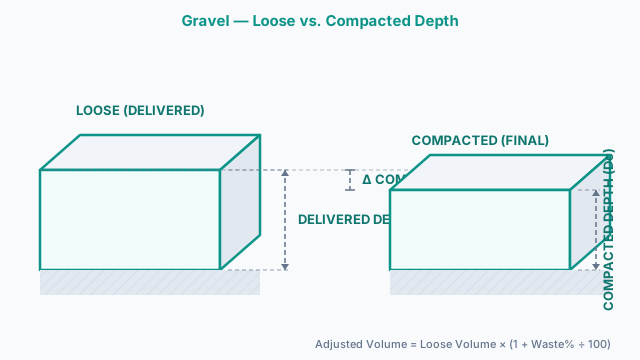
- 5Set the Waste Factor (default 10%). Use roughly 10% for loose decorative cover or landscaping fill, and 20–25% when the gravel is going into a compacted base course, since compaction shrinks the loose volume.
- 6Optionally enter a Price and choose whether it is Per Ton or Per Cy (cubic yard) — match this to how your supplier quotes so the estimated cost lines up with the invoice.
- 7Press Calculate. The results panel returns the volume in yd³, ft³, and m³, the weight in tons, pounds, and kilograms, the total footprint area, the density used, and the estimated cost.
- 8Check the density read-back in the results against the material you are actually buying — if it does not match, switch to Custom Density and re-run, since density drives the entire tonnage figure.
- 9For an irregular footprint, split it into rectangles, circles, and triangles, run each shape separately, and add the cubic-yard results before ordering.
- 10Click Print / Save to open a branded summary of every input and result, then choose Save as PDF in your browser's print dialog to keep an ordering record.
How the Gravel Tonnage Is Calculated
- 1) Footprint AreaRectangle: Area = Length × Width | Circle: Area = π × Radius² | Triangle: Area = (Base × Height) ÷ 2
All dimensions are converted to feet before the area is computed, so a footprint measured in mixed units resolves to a single square-foot value. - 2) Loose VolumeVolume (ft³) = Area (ft²) × Depth (ft) | Volume (yd³) = Volume (ft³) ÷ 27
Depth is converted to feet from its own unit first, independent of the footprint unit. The cubic-yard figure (÷ 27) is the number a bulk supplier loads against. - 3) Waste AdjustmentAdjusted Volume = Loose Volume × (1 + Waste% ÷ 100)
Applied to the volume before weight and cost are computed. Roughly 10% covers handling loss for decorative or landscaping work; 20–25% accounts for the volume lost when gravel is compacted into a base. - 4) Weight From DensityWeight (lb) = Adjusted Volume (ft³) × Density (lb/ft³) | Weight (tons) = Weight (lb) ÷ 2,000
Density is the bridge between volume and tonnage. The calculator uses the density of the Gravel Type you select — General, Pea, Crushed, or your Custom Density — which is why two orders of the same cubic-yard volume can weigh out very differently. - 5) Tons-to-Yards Relationshiptons/yd³ = Density (lb/ft³) × 27 ÷ 2,000
At 105 lb/ft³ this gives ≈ 1.42 tons per cubic yard; at 100 lb/ft³, ≈ 1.35. Invert it (yd³/ton = 1 ÷ tons/yd³) to convert a supplier's tonnage quote back to volume. - 6) Estimated CostCost = Price/ton × Weight (tons) or Price/yd³ × Volume (yd³)
The calculator prices on whichever unit you selected in Step 3. This is material cost only — it excludes delivery, spreading labor, and fuel surcharges; for a full line-item budget, use the gravel cost calculator.
Worked Takeoff: A 6 ft-Radius Circular Fire Pit Surround
You are covering the ground around a backyard fire pit with a circular gravel surround, 6 ft in radius, at a 3 in depth of General Gravel (105 lb/ft³), using the calculator's default 10% waste factor and a supplier price of $45 per ton.
- Footprint area = π × (6 ft)² = π × 36 = 113.10 ft²
- Depth = 3 in ÷ 12 = 0.25 ft
- Loose volume = 113.10 ft² × 0.25 ft = 28.27 ft³ (1.05 yd³)
- 10% waste factor = 28.27 × 1.10 = 31.10 ft³ adjusted, or 31.10 ÷ 27 = 1.15 yd³
- Weight = 31.10 ft³ × 105 lb/ft³ = 3,266 lb ÷ 2,000 = 1.63 tons
- Estimated cost at $45/ton = 1.63 × $45 ≈ $73.48
Notice that the same 1.15 yd³ ordered as pea gravel (100 lb/ft³) instead of general gravel would weigh only about 1.56 tons and cost roughly $70.20 — the volume is identical, but the tonnage and the bill both shift with density. That single fact is why this calculator leads with material type, not just dimensions. Had the fire pit surround instead been a rectangular 10 × 4 ft border at the same depth and waste factor, the footprint would drop to 40 ft², the loose volume to 10 ft³, and the adjusted order to about 0.41 yd³ and 0.58 tons — worth checking before assuming a circular layout and a rectangular one need the same tonnage.
Quantity Mistakes That Leave a Gravel Order Short
- 1Ordering the wrong unit — tons versus cubic yards
Suppliers sell gravel by the ton and by the cubic yard, and the two are not interchangeable without density. Ordering "3" when the yard means tons and you meant cubic yards leaves you roughly 30% short. Always state the unit explicitly, and use the gravel tons-to-yards calculator to reconcile a quote before it ships.
- 2Using one density preset for every gravel type
Pea gravel (~100 lb/ft³) and dense-graded crusher run (~120 lb/ft³) differ by 20% in weight for the same volume. Picking the closest built-in preset — General, Pea, or Crushed — gets you close, but for a material like river rock, decomposed granite, or lava rock that sits outside those three presets, enter the exact figure under Custom Density instead of guessing.
- 3Leaving the waste factor at a decorative default for a compacted fill
The calculator's Waste Factor covers both spillage and compaction shrinkage, but the right number depends on the job. A base course that gets compacted loses roughly 20–25% of its loose volume, while decorative landscaping cover only needs about 10% for handling loss. Applying a flat 10% to a fill that will actually be compacted comes up short every time.
- 4Splitting an irregular footprint but forgetting to add every section
This calculator computes one shape at a time — rectangle, circle, or triangle. For an L-shaped bed, a path with a curved end, or a trench with a wider pit at one end, run the calculator once per section and add the cubic-yard results together before ordering. Skipping a section, or double-counting an overlap between two sections, is a common source of a short — or wasted — order.
- 5Forgetting moisture when paying by weight
Damp or freshly washed gravel weighs 5–15% more than dry material of the same volume. If you are billed by the ton, a rain-soaked load delivers less actual coverage than the tonnage suggests, so build in a little extra when ordering in wet conditions or right after a delivery has been rained on at the yard.
When to Use the Gravel Calculator vs. Related Tools
Use this general Gravel Calculator as your starting point for landscaping fill, drainage, backfill, and walkway base — any project where you have not settled on one specific gravel product, or where the job is small and general enough that a dedicated spoke calculator would be overkill. Its three built-in density presets plus a Custom Density field let you compare tonnage across the most common stone types in one pass.
Switch to the Gravel Driveway Calculator when the job is a compacted, multi-layer driveway build — it handles sub-base, base, and surface course layering with a per-layer compaction factor that a single-pass general estimate does not model. For a purely decorative bed, path, or fire pit surround using rounded ⅜ in stone, the Pea Gravel Calculator fixes the density at pea gravel's typical figure and adds bag-count guidance sized for landscaping-store bag purchases.
If you already have a supplier's tonnage quote and just need the cubic-yard volume it represents — no project dimensions required — the Gravel Tons to Yards Calculator does the pure unit conversion in one step. When your fill material is recycled rather than quarried stone, the Crushed Concrete Calculator applies the lighter recycled-concrete-aggregate (RCA) density instead of this page's quarried-aggregate defaults. And when the primary question is total project budget — delivery, spreading labor, and regional pricing — rather than raw material quantity, the Gravel Cost Calculator leads with the price breakdown instead.
Manufacturer & Standard References
Defines the size numbers (#1 through #10, plus blends like #57 and #67) that suppliers use to name gravel and crushed stone. Knowing the size class helps you match a density preset in this calculator, or a Custom Density entry, to the material you are actually buying.
Specifies grading and quality requirements for coarse and fine aggregates. The unit-weight figures used to convert gravel volume to tonnage are based on aggregates meeting this standard, which is why washed, well-graded stone tracks this page's reference densities closely.
Governs the dense-graded base aggregates (crusher run, ABC, Class 5) that are placed and compacted under pavements. It is the reason base-course gravel is ordered with a 20–25% compaction allowance rather than the plain loose volume this calculator computes by default.
Density and tonnage figures on this page are typical dry, loose values; actual weight varies with moisture, gradation, and compaction. Confirm the compaction factor and material specification with your supplier before ordering for structural fill, base course, or load-bearing applications.
Common Gravel Questions
How do I calculate how much gravel I need?
Multiply the footprint area by the gravel depth, with all dimensions in the same unit, then convert to cubic yards by dividing the cubic-foot result by 27. For example, a 12 × 12 ft area at 4 in deep is 144 ft² × 0.333 ft = 48 ft³ ÷ 27 = 1.78 yd³. This calculator does the unit conversion, the waste adjustment, and the tonnage automatically once you enter the dimensions and pick a gravel type.
How do I convert cubic yards of gravel to tons?
Multiply cubic yards by the material's tons-per-yard factor, which comes from its density: tons/yd³ = density (lb/ft³) × 27 ÷ 2,000. General gravel at 105 lb/ft³ is about 1.42 tons per cubic yard, while pea gravel at 100 lb/ft³ is about 1.35. So 2 yd³ of general gravel weighs roughly 2.84 tons. The calculator applies the correct factor for whichever gravel type you select.
How much does a cubic yard of gravel weigh?
A cubic yard of typical dry gravel weighs about 2,300 to 3,400 lb, or roughly 1.15 to 1.7 tons, depending on the stone type. Lightweight lava rock sits far below that range at roughly 1,200–1,500 lb per yard, pea gravel is toward the lighter end of the standard range (~2,700 lb), and dense-graded crusher run is toward the heavy end (~3,100–3,400 lb). Moisture raises these figures by 5 to 15 percent.
How many cubic yards are in a ton of gravel?
Invert the tons-per-yard factor: yd³/ton = 1 ÷ (tons/yd³). For general gravel at 1.42 tons/yd³ that is about 0.70 cubic yards per ton; for lighter pea gravel, closer to 0.74. As a rule of thumb, one ton of typical gravel covers roughly 0.7 cubic yards of loose volume.
What density should I use if my gravel type isn't listed?
Pick the closest built-in preset — General, Pea, or Crushed — as a first approximation, then switch to Custom Density and enter the supplier's exact lb/ft³ figure once you know it. River rock, decomposed granite, and lava rock, for example, all fall outside the three presets and are best entered as a custom value so the tonnage lines up with the scale house.
How deep should gravel be?
Depth depends on the use: 2 to 3 inches for decorative ground cover, 3 to 4 inches for a walkway or patio base, and 4 to 6 inches for a driveway or heavier fill layer over a prepared sub-grade. Deeper layers may be split into a compacted sub-base and a surface course — the gravel driveway calculator handles multi-layer build-ups.
Should I order gravel by the ton or by the cubic yard?
It depends on how your supplier quotes — some sell by weight (ton), others by volume (cubic yard). Neither is wrong, but the two only match if you use the right density to convert. State the unit explicitly when ordering, and use the density read-back in this calculator, or the tons-to-yards calculator, to translate between them so you don't end up 30 percent short.
How much extra gravel should I add for waste and compaction?
Add about 10 percent for loose decorative cover or general landscaping fill to allow for spillage and uneven ground. For a base course that must be compacted, add 20 to 25 percent instead, because dense-graded gravel loses roughly a fifth of its loose volume once it is rolled. The calculator's Waste Factor field lets you set this directly.
Does gravel weigh more when it is wet?
Yes. Water clinging to the stone adds weight without adding volume, so damp or freshly washed gravel can weigh 5 to 15 percent more than the same material dry. If you are paying by the ton, a wet load delivers slightly less actual coverage than the tonnage implies, so order a little extra in wet conditions.
What is the difference between pea gravel, crushed stone, river rock, and bank-run gravel?
Pea gravel is small (about ⅜ in), rounded, and decorative, with a density near 100 lb/ft³. Crushed stone is angular and graded by size number (such as #57), locks together well, and runs about 100 to 105 lb/ft³. River rock is larger (1–3 in) and rounded, at a lighter 85–95 lb/ft³. Bank-run gravel is an unscreened sand-and-stone mix straight from the pit at 110 to 120 lb/ft³. For a decorative pea-gravel job specifically, the pea gravel calculator has tailored coverage guidance.
How do I calculate gravel for a circular or triangular area?
Switch the shape selector. For a circle, the calculator uses Area = π × radius², so a 6 ft radius gives about 113 ft²; for a triangle it uses Area = (base × height) ÷ 2. It then multiplies by depth exactly as it does for a rectangle. For an L-shaped or otherwise irregular area, split it into simple shapes, run each, and add the cubic-yard results.
How much gravel do I need for a 10 x 10 ft area at 3 inches deep?
The footprint is 100 ft², and 3 in is 0.25 ft, so the loose volume is 100 × 0.25 = 25 ft³ ÷ 27 = 0.93 yd³. At a general gravel density of 105 lb/ft³ that is about 1.31 tons before waste. Adding the default 10 percent waste factor brings it to roughly 1.02 yd³ and 1.44 tons.
What does a gravel size number like #57 mean?
Size numbers come from ASTM D448, which classifies aggregate by the range of sieve sizes it passes. A #57 stone, for example, is roughly ¾ in to 1 in material with the fines screened out, which is why it drains well and is popular for driveways and drainage. The size affects how the stone packs and drains but only slightly changes its density.
Is gravel the same as crushed stone or aggregate?
They overlap but are not identical. "Gravel" traditionally means naturally rounded stone, "crushed stone" is mechanically broken angular rock, and "aggregate" is the umbrella term for both plus sand and recycled material used in concrete and base courses. This calculator covers any of them for a general project — just match the density preset, or a Custom Density value, to the specific material you are buying.
Can I use this calculator for a driveway, a decorative bed, or to price a delivery?
Yes for a first estimate, but the cluster has dedicated tools that go further. Use the gravel driveway calculator for layered, compacted driveway builds, the pea gravel calculator for a purely decorative bed with bag-count guidance, and the gravel cost calculator when delivery and labor drive the budget. This page is the general-purpose volume-and-weight estimator that all of them build on.
Related Calculators
Gravel Driveway Calculator
Estimate driveway gravel in tons, yards, and total cost.
Pea Gravel Calculator
Estimate pea gravel needed for landscaping.
Gravel Tons to Yards Calculator
Convert between gravel tons and cubic yards.
Gravel Cost Calculator
Estimate total project cost including delivery for gravel projects.
Crushed Concrete Estimator Calculator
Calculate crushed concrete volume, tons, coverage, and total cost with compaction adjustments.