Column Concrete Calculator
Built by Shakeel Alvi · Technically reviewed by Muhammad Qasim, PEC Reg. No. 63430 · Last reviewed: 2025-10-24
Easily estimate the concrete volume needed for rectangular, square, or circular columns. Enter your dimensions, choose units, and get instant results with waste and dry-volume options.
Estimate volume for rectangular/square or circular columns. Includes quantity and waste allowance.
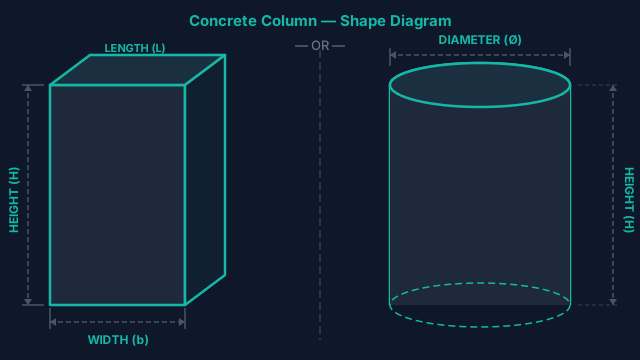
Keep all dimensions in the same unit. Rectangular: L × W × H. Circular: π × r² × H.
Enter values above and press Calculate to reveal results.
How the Calculator Works
Rectangular / Square: Convert inputs to meters, compute L × W × H. Multiply by Quantity, then apply waste: V × (1 + waste%).
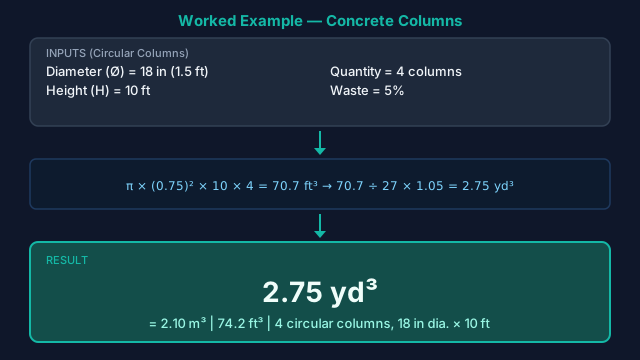
Circular: Convert diameter and height to meters, compute π × r² × H with r = diameter / 2. Multiply by Quantity, then add waste.
Use the output unit toggle to view results as m³, ft³, or yd³.
How to Estimate Concrete for Columns
Accurate volume estimation for concrete columns is essential for strong structural supports and saving money on material. Using this calculator, you can quickly find volume for cylindrical or rectangular columns to prevent costly over-ordering or mid-pour shortages.
Key Features of Our Free Column Concrete Calculator
Rectangular / Square Columns
Compute volume using L × W × H with automatic unit handling.
Circular Columns
Calculate π × r² × H from diameter and height—with conversions built-in.
Multi-Unit Inputs
Enter dimensions in meters, centimeters, feet, or inches; results stay consistent.
Quantity & Waste Allowance
Multiply per-column volume by count and add a waste % (commonly 5–10%).
Display Units Toggle
Show totals in m³, yd³, or ft³ without re-entering your inputs.
Clear, Gated Results
Results appear after Calculate to avoid accidental reads and keep focus on inputs.
Print / Save
Export a tidy summary of inputs and results; includes yd³ helpers (+5% / +10%).
How to Use the Column Concrete Calculator
- 1Select the Rectangular / Square or Circular tab.
- 2Choose your unit (m, cm, ft, or in) and enter dimensions.
- 3Enter the Quantity (No. of Columns) and a Waste % (e.g., 5–10%).
- 4Press Calculate to reveal results.
- 5Use Show in to toggle m³, yd³, or ft³ as needed for ordering.
- 6Optionally hit Print / Save Calculations to export a clean summary.
Why Choose Our Free Column Calculator?
- Supports both rectangular/square and circular columns in one tool.
- Accurate unit conversions and numeric input guards reduce entry errors.
- Quantity and waste % built in—perfect for multi-column projects.
- One-click display switch between m³, yd³, and ft³ for ordering.
- Printable summary helps communicate quantities to suppliers and crews.
Formulas Used in the Calculator
- 1) Rectangular / Square ColumnGross Volume per Column = L × W × H
(Inputs are converted to a common base before multiplication to avoid unit mismatch.) - 2) Circular ColumnGross Volume per Column = π × r² × H
r = Diameter ÷ 2 - 3) Quantity & WasteNet Total = Per-Column Volume × Quantity
With Waste = Net Total × (1 + Waste%) - 4) Display Conversions1 m³ = 35.3147 ft³
1 m³ = 1.30795 yd³
Standards & References
Establishes design and detailing requirements for concrete columns, including minimum dimensions, reinforcement ratios, tie spacing, and concrete cover.
Provides the mix design framework for selecting concrete proportions that meet the strength (f'c) required by structural drawings for column construction.
Defines requirements for ready-mix truck delivery — essential for column pours where consistent mix quality and timely placement are critical.
Standards cited for reference. Always consult a licensed structural engineer for project-specific requirements.
Frequently Asked Questions
Does the calculator handle both rectangular and circular columns?
Yes. Use the tabs to switch between Rectangular/Square and Circular modes; each uses the appropriate geometric formula.
Which input units are supported?
Meters, centimeters, feet, and inches for dimensions. You can display results in cubic meters, cubic yards, or cubic feet.
How much waste should I add?
Many projects use 5–10% to cover spillage, pumping losses, and subgrade variation. Always follow your project's specification.
Can I enter multiple columns at once?
Yes. Enter the quantity of columns; the tool multiplies per-column volume to produce net totals and totals with waste.
How do I get cubic yards for ordering?
After calculating, set the display to yd³, or use the built-in yardage helper that also shows +5% and +10% options.
Does this include reinforcement or mix design?
No. The tool focuses on volume. Reinforcement, cover, and mix grade must follow your structural drawings and local codes.
Related Calculators
Slab Concrete Calculator
Estimate concrete for floors, patios & driveways.
Beam Concrete Calculator
Volume for rectangular or multi-span beams.
Footing Concrete Calculator
Strip & isolated footing volume estimates.
Wall Concrete Calculator
Compute concrete for straight or segmented walls.
Pier / Caisson Calculator
Drilled shaft & caisson concrete volumes.
Tank / Trench Calculator
Rectangular & circular tank/trench volumes.
Staircase Concrete Calculator
Total volume for flights, landings & risers.
Nominal Mix (M5–M25)
Material splits for standard nominal mixes.
Concrete Yards Calculator
Convert area/thickness into cubic yards & m³.
Concrete Bag Calculator
Calculate how many concrete bags you need with unit conversions, bag sizes (40/50/60/80 lb & 20 kg), and waste buffers. Covers slabs, footings, posts, and sonotubes.