How Much Concrete a Sidewalk Takes
The Concrete Sidewalk Calculator turns three simple dimensions — length, width, and thickness — into a complete material takeoff: cubic yards, cubic feet, and cubic metres of concrete, plus 60-lb and 80-lb pre-mixed bag counts for small pours. It also computes control joint count, expansion joint count, and slab weight, and checks your control joint spacing against ACPA (American Concrete Pavement Association) recommendations automatically. A live plan-view joint diagram draws the joint pattern at true proportions every time you calculate. A sidewalk is a long, narrow slab on ground, so the volume math is the same one covered in our pillar guide on how to calculate concrete for a slab.
Beyond raw volume, the calculator carries a few things most sidewalk takeoffs skip: three one-click project-type presets (Residential 4″ × 4 ft, Municipal/ADA 6″ × 5 ft, Garden Walkway 4″ × 3 ft) that load sensible starting dimensions and joint spacings; a proportional plan-view diagram that draws teal dashed control joints and orange solid expansion joints at their calculated positions; and, in Advanced mode, a full cost estimate from price per cubic yard, finishing labour, and delivery fees. To budget the job, see how much a concrete slab costs; for small hand-mixed pours, our guide to how many concrete bags a slab needs gives bag counts; and for crack control, review how to reinforce a concrete slab.
Worked Example: 50 ft Residential Sidewalk
Say you're pouring a 50 ft long, 4 ft wide residential sidewalk at 4 inches thick — a typical front-yard run. Convert thickness to feet: 4″ ÷ 12 = 0.333 ft. Net volume: 50 ft × 4 ft × 0.333 ft = 66.6 ft³, or 66.6 ÷ 27 = 2.47 yd³. Add the standard 10% waste factor for subbase irregularities and spillage: 66.6 ft³ × 1.10 = 73.26 ft³ (2.71 yd³) — round up to 2.75 yd³ on the ready-mix ticket, since most plants sell in quarter-yard increments.
For control joints: at 4 ft width, the ACPA maximum spacing is min(1.5 × 4 ft, 15 ft) = 6 ft. Pick 5 ft spacing to stay under that ceiling — ⌈50 ÷ 5⌉ − 1 = 9 interior control joints. Add one expansion joint where the sidewalk meets the driveway apron at one end. If you're pouring in bags instead of ordering ready-mix, 73.26 ft³ ÷ 0.45 ft³ (60 lb bag) = 163 bags of 60 lb mix, or 73.26 ÷ 0.60 = 123 bags of 80 lb mix — at that volume, most crews call for ready-mix rather than hand-mixing over a hundred bags. The finished slab weighs 73.26 ft³ × 150 lb/ft³ ≈ 10,989 lb (5.5 tons).
Entering Your Sidewalk Dimensions
- 1Select a project type preset — Residential, Municipal/ADA, or Garden Walkway — to load sensible defaults, or enter your own dimensions from scratch.
- 2Enter the sidewalk length (the longest dimension along the path direction). Choose feet, inches, or metres.
- 3Enter the sidewalk width (perpendicular to travel). ADA-accessible paths require at least 36 inches of clear width; 4 feet is standard for residential.
- 4Enter the slab thickness. Use 4 inches for pedestrian-only sidewalks; 6 inches for municipal, ADA, or heavy-use paths.
- 5Set the waste factor (default 10%) to account for subbase irregularities, spillage, and overfill. Use 15% for curved or uneven paths.
- 6Enter your control joint spacing. Per ACPA guidance, this should be 1× to 1.5× the slab width, with an absolute maximum of 15 ft. The calculator warns if you exceed this.
- 7Enter your expansion joint spacing. Expansion joints should be placed every 20–30 ft along the run and at every structure (walls, steps, curbs) the sidewalk abuts.
- 8Switch to Advanced mode to enter concrete price per cubic yard, finishing cost, and delivery fees for a complete project cost estimate.
- 9Press Calculate. Review cubic yards, bags, weight, joint counts, and the ACPA compliance status.
- 10Check the plan-view joint diagram — it shows the entire sidewalk top-down with teal dashed control joints and orange solid expansion joints at their proportional positions.
- 11Use Print / Save to export a PDF for purchase orders, permits, or contractor bid documentation.
The Concrete Sidewalk Volume Formula
- 1) Net concrete volumeNet Volume (ft³) = Length (ft) × Width (ft) × Thickness (ft)
All dimensions converted to feet before multiplication. Thickness is entered in inches and divided by 12. - 2) Gross volume with waste factorGross Volume (ft³) = Net Volume × (1 + Waste % ÷ 100)
The waste factor covers subbase irregularities, spills during placement, and form overfill. 10% is standard; 15% for curved or sloped paths. - 3) Volume unit conversionsCubic yards = Gross Volume (ft³) ÷ 27
Cubic metres = Gross Volume (ft³) × 0.0283168
Ready-mix concrete is ordered in cubic yards in North America. Always round up to the nearest 1/4 yard when ordering. - 4) Pre-mixed bag counts60-lb bags = ⌈Gross Volume (ft³) ÷ 0.45⌉
80-lb bags = ⌈Gross Volume (ft³) ÷ 0.60⌉
Yields per ACI 211: 60-lb = 0.45 ft³; 80-lb = 0.60 ft³. Always rounded up to a whole bag. Bags become uneconomical above about 1 yd³. - 5) Slab weightWeight (lbs) = Gross Volume (ft³) × 150 lb/ft³
Standard normal-weight concrete density is 150 lb/ft³ (approximately 2,400 kg/m³). Includes water weight after curing is complete. - 6) Control joint countControl Joints = ⌈Length ÷ Spacing⌉ − 1
Counts interior joints only (not the slab ends). A 50 ft sidewalk with 5 ft spacing has 9 interior control joints. - 7) ACPA control joint maximum checkACPA Max Spacing = min(1.5 × Slab Width, 15 ft)
Warning fires when: Control Joint Spacing > ACPA Max Spacing
Per ACPA (American Concrete Pavement Association) guidance. Wider spacing significantly increases the probability of uncontrolled mid-panel cracking. - 8) Cost estimate (Advanced)Material Cost = Cubic Yards × Price per Yard
Grand Total = Material Cost + Finishing Cost + Delivery Cost
Concrete is priced per cubic yard. Ready-mix pricing varies by region, mix design, and delivery distance.
Sidewalk Thickness, Strength & Joint Spacing at a Glance
The table below summarises common sidewalk specifications. Concrete strength (PSI) and joint spacing recommendations follow ACI 330R-01 (Guide for Design and Construction of Concrete Parking Lots) and ACPA published guidance. Always verify with your local municipality, which may have specific requirements for right-of-way sidewalks.
| Application | Thickness | Min PSI | Control joint max |
|---|---|---|---|
| Residential foot traffic | 4" | 2,500–3,000 | 6 ft (1.5× width) |
| Garden / backyard walkway | 4" | 2,500 | 4.5 ft (1.5× width) |
| Shared / light access | 5" | 3,000 | 7.5 ft (1.5× width) |
| Municipal / ADA | 6" | 3,500–4,000 | 7.5–9 ft |
| Service / utility access | 6–8" | 4,000 | 8–10 ft |
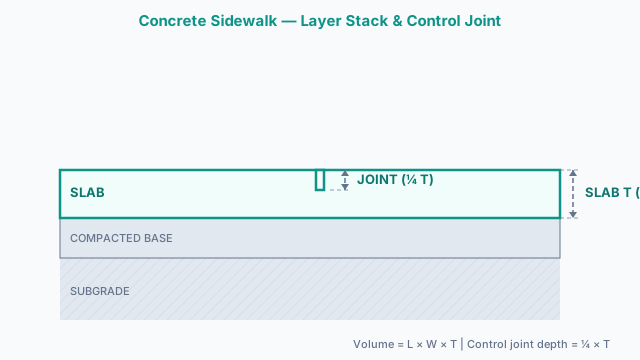
Control joint depth = 1/4 of slab thickness minimum. Saw-cutting must occur within 4–12 hours of placement on warm days. Tooled joints are formed during finishing. Expansion joint filler: 1/2" pre-formed asphalt or cork board. Local codes may require air-entrainment (5–7%) in freeze-thaw climates.
Ordering Mistakes That Leave a Sidewalk Short
- Skipping the waste factor. Ordering the bare computed volume assumes a perfectly flat, undamaged subbase. Use 10% for standard runs and 15% for curved or sloped paths — skip it and you're calling for a second short-load delivery.
- Exceeding the ACPA control-joint maximum. The ACPA ceiling is min(1.5 × slab width, 15 ft) — for a 4 ft wide sidewalk that's 6 ft. Spacing joints wider than that to save a saw cut significantly raises the odds of uncontrolled mid-panel cracking that no amount of correct volume ordering will fix.
- Under-sizing width for ADA access. ADA requires 36″ minimum clear width, but most municipalities want 48″ on public rights-of-way, with 60″ passing spaces every 200 ft. Ordering to the bare 36″ minimum on a public-facing walk often fails inspection.
- Missing expansion joints at abutting structures. Every wall, step, or curb the sidewalk touches needs a full-depth expansion joint with compressible filler. Skip one and the slab pushes against the structure as it expands, cracking one or both.
Pairing the Sidewalk Calculator with Other Tools
The Concrete Sidewalk Calculator is best suited for linear sidewalk runs where joint planning and ACPA compliance matter. For a backyard patio or poolside deck with the same geometry but different context, the concrete patio calculator or the broader slab concrete calculator provide the same volume math without the joint planner. When the flatwork will be reinforced with welded wire fabric, the wire mesh calculator estimates rolls and sheets based on your slab area. Rebar-reinforced sidewalks can be quantified with the rebar calculator. For the pre-mix bag count before ordering at the home center, use the concrete bag calculator. Where the sidewalk runs alongside a roadway curb and gutter section, the curb and gutter calculator estimates that adjacent pour, and a quick top-level yardage check for the whole project is available from the concrete yards calculator.
Mix & Placement Standards
ACI flatwork guide covering concrete strength, thickness selection, and joint spacing for exterior concrete surfaces including sidewalks and walkways. The ACPA-based control joint spacing recommendations in this calculator align with guidance in this document.
Covers concrete slab-on-ground construction methods applicable to sidewalks, including subbase requirements, 4–6 inch thickness guidance, and the bag yield values (60-lb = 0.45 ft³; 80-lb = 0.60 ft³) used in this calculator.
Governs ready-mix delivery for sidewalk pours — the preferred method for any sidewalk longer than about 20 feet. Specifies slump requirements and maximum delivery time limits critical to placing concrete before it begins to set.
Public sidewalks must meet ADA cross-slope limits (2% maximum) and local utility setback requirements; consult a licensed civil engineer before pouring in public rights-of-way or adjacent to underground utilities.
Sidewalk Concrete — Questions Before You Order
How many cubic yards of concrete do I need for a sidewalk?
Multiply length × width × thickness (all in feet) and divide by 27 to get cubic yards. For a 50 ft × 4 ft × 4-inch sidewalk: 50 × 4 × 0.333 = 66.6 ft³ ÷ 27 = 2.47 yd³. Add 10% waste: 2.72 yd³. Our calculator handles this automatically in all units.
How thick should a concrete sidewalk be?
Residential sidewalks for pedestrian traffic only are typically 4 inches thick. Municipal and ADA-accessible sidewalks are usually 6 inches. Sidewalks that cross driveways or receive occasional vehicle traffic should be 6 inches minimum. Increase to 8 inches for light vehicle crossings that occur frequently.
What PSI concrete should I use for a sidewalk?
2,500–3,000 PSI is the minimum for residential sidewalks with foot traffic only. Use 3,500–4,000 PSI for municipal, ADA, or heavy-use paths. In freeze-thaw climates (USDA Zone 4 and colder), specify air-entrained concrete with 5–7% air content to resist freeze-thaw spalling.
How far apart should control joints be in a concrete sidewalk?
The American Concrete Pavement Association (ACPA) recommends control joint spacing of 1× to 1.5× the slab width, with an absolute maximum of 15 feet. For a 4-foot-wide sidewalk, control joints should be placed every 4–6 feet. Our calculator warns you if your spacing exceeds this limit.
What is the difference between a control joint and an expansion joint?
A control joint (contraction joint) is a tooled groove or saw cut to a depth of 1/4 of the slab thickness. It creates a weak plane that guides the inevitable shrinkage crack to a controlled location. An expansion joint is a full-depth gap filled with compressible material (asphalt board, cork, or foam) that allows the slab to expand without pushing against adjacent structures. Expansion joints are required wherever the sidewalk meets walls, steps, or curbs.
How deep should control joints be cut in a concrete sidewalk?
Control joints must be at least 1/4 of the slab thickness deep. For a 4-inch slab that is 1 inch. For a 6-inch slab that is 1.5 inches. Tooled joints are formed during finishing while the concrete is still plastic; saw-cut joints should be made within 4–12 hours of placing on warm days, or 12–24 hours on cool days, before random cracking occurs.
How many bags of concrete do I need for a sidewalk?
Divide the total volume in cubic feet by the bag yield: 0.45 ft³ for a 60-lb bag, 0.60 ft³ for an 80-lb bag. For a 2.72 yd³ pour (73.4 ft³): 73.4 ÷ 0.45 = 163 sixty-pound bags, or 73.4 ÷ 0.60 = 123 eighty-pound bags. For any project larger than 1 yd³, ready-mix is more economical and practical.
Should I use ready-mix or bags for a sidewalk?
For sidewalks longer than 15–20 feet, ready-mix delivered by a transit truck is almost always more economical and produces better, more consistent concrete. Bags are practical for very small patches or repairs under 0.5 yd³. The labour cost of mixing dozens of bags often exceeds the delivered ready-mix price for anything larger.
What is the minimum width for an ADA-accessible sidewalk?
ADA standards require a minimum clear width of 36 inches (3 feet) for accessible routes. However, wherever the accessible route is a sidewalk adjacent to the street, most municipalities require 48 inches (4 feet) minimum clear width. Passing spaces for two wheelchairs require 60 inches (5 feet) every 200 feet along the route.
How much does it cost to pour a concrete sidewalk?
Concrete sidewalk cost in the US typically ranges from $6 to $12 per square foot installed, covering concrete material, forming, placement, finishing, and curing. A 50 ft × 4 ft sidewalk (200 sq ft) typically costs $1,200 to $2,400. Ready-mix concrete alone is $130–$180 per cubic yard depending on region and mix design. Use the Advanced mode in our calculator to build a project-specific estimate.
How do I calculate the amount of concrete for a sidewalk in metric?
Multiply length × width × thickness (all in metres) to get cubic metres directly. For example: 15 m × 1.2 m × 0.1 m = 1.8 m³. Add 10% waste: 1.98 m³. Our calculator accepts metre inputs and shows the result in cubic metres alongside cubic yards and cubic feet.
What is a waste factor for concrete and why do I need it?
Concrete waste (or overpour factor) accounts for volume lost due to subbase irregularities, concrete splashed or spilled during placement, form deflection under pressure, and the unavoidable fact that fresh concrete is ordered in whole or half yard increments. 10% is the industry standard; use 15% for curved sidewalks, sloped sites, or irregular subbase conditions.
Is the concrete sidewalk calculator free?
Yes. The Concrete Sidewalk Calculator on Concrete Calculator Max is completely free with no registration, subscription, or hidden fees. All features — volume, bags, joint planning, the plan-view diagram, and cost estimation — are available at no cost.
Can I print or save my sidewalk concrete estimate?
Yes. After calculating, press Print / Save to open a print-ready report with all inputs, results, and ACPA joint compliance status. In your browser's print dialog, choose Save as PDF to keep a digital copy for purchase orders, permits, or contractor bids.
What is the plan-view joint diagram?
The plan-view joint diagram is a top-down proportional drawing of your sidewalk showing control joints (teal dashed lines) and expansion joints (orange solid lines) at their calculated positions. It redraws every time you calculate, giving you a visual check that your joint pattern makes sense before placing any concrete.
Related Calculators
Slab Concrete Calculator
Estimate concrete for slabs, patios, and floors.
Concrete Patio Calculator
Estimate concrete volume, bags, and cost for slabs, patios, and floors.
Concrete Slab Cost Calculator
Estimate cost of concrete for slabs, patios, and floors.
Wire Mesh Calculator
Estimate welded wire fabric rolls, sheets, weight, and cost for concrete slabs, driveways, sidewalks, and industrial floors.
Concrete Pad Calculator (AC, Shed, Hot Tub, Generator)
Estimate concrete volume, bag counts, and cost for small equipment pads — AC unit, shed, hot tub, and generator presets included.
Curb & Gutter Concrete Calculator
Calculate concrete volume for curb and gutter in yd³, ft³, and m³ with a gutter pan and curb body breakdown. Barrier, rollover, and mountable presets with AASHTO GDPS-4-M compliance check.